My External GPU Would Not Run Over Thunderbolt — Three GPU Generations Tested | Intel Arc B580 Local LLM Part 5
I tried running an external GPU — an eGPU, where the graphics card lives in a box outside the PC — on the machines I own, working through three graphics cards from three different generations. None of them worked over Thunderbolt. Stranger still, each of the three failed at a different point.
This article is the record of that failure. With the same GPU, the same host, and the same dock, changing nothing but the connection — Thunderbolt to OCuLink — made it work immediately. Is the deciding factor the GPU generation, or the connection itself?
The machines here are a GMKtec EVO-X2 (referred to below as the EVO-X2) and an Apple Mac mini M4. The dock is an AOOSTAR AG03, and the GPUs are an NVIDIA GeForce RTX 5060 Ti, an RTX 3060, and an Intel Arc B580. As of July 2026.
The previous article is here
 https://kimono-oyaji.com/arc-b580-context-length-spill-en/
- 1. The equipment
- 2. Why try an external GPU at all?
- 3. The test: three GPU generations down the same path
- 4. Result: all three stopped, but in three different places
- 5. Is there something wrong with Thunderbolt?
- 6. What decides it is the path, not the compatibility list
- 7. What this article cannot tell you: the roads not taken
- 8. In summary: what failed was the path, not the GPU generation
- 9. Sources
- 10. Hardware used in this test
The equipment
The EVO-X2 mini PC acted as the host, with three GPUs of different generations attached through an AOOSTAR AG03 eGPU dock. For comparison I also checked an Apple Mac mini M4, and the same Arc B580 seated directly in a desktop PCIe slot.
The GPUs I tried
- Intel Arc B580 (12GB, Battlemage generation, 2024)
- NVIDIA GeForce RTX 5060 Ti (16GB, Blackwell generation, 2025)
- NVIDIA GeForce RTX 3060 (12GB, Ampere generation, 2021)
- For comparison: NVIDIA GeForce RTX 3090 (24GB, seated directly in a desktop)
As an Amazon Associate we earn from qualifying purchases.
NVIDIA GeForce RTX 3090 24GB24GB VRAM, runs 27B-32B
The PCs
| Mini PC (host) | GMKtec EVO-X2 (Ryzen AI Max+ 395 / Radeon 8060S / 128GB unified memory / Ubuntu) |
| Comparison | Apple Mac mini M4 |
| Comparison desktop | Ryzen 9 3950X / RTX 3090 (used for the Arc B580 direct-slot check) |
GMKtec EVO-X2 (Ryzen AI Max+ 395 / 128GB / 2TB)128GB unified memory mini PC
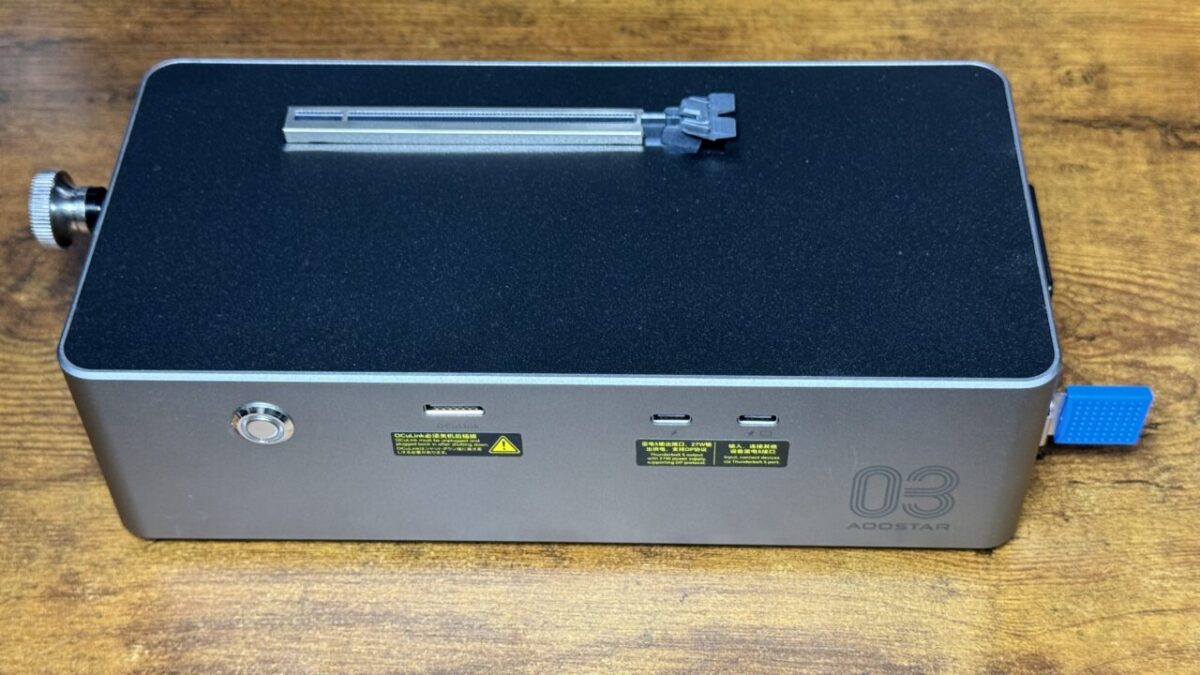
The Thunderbolt box: AOOSTAR AG03
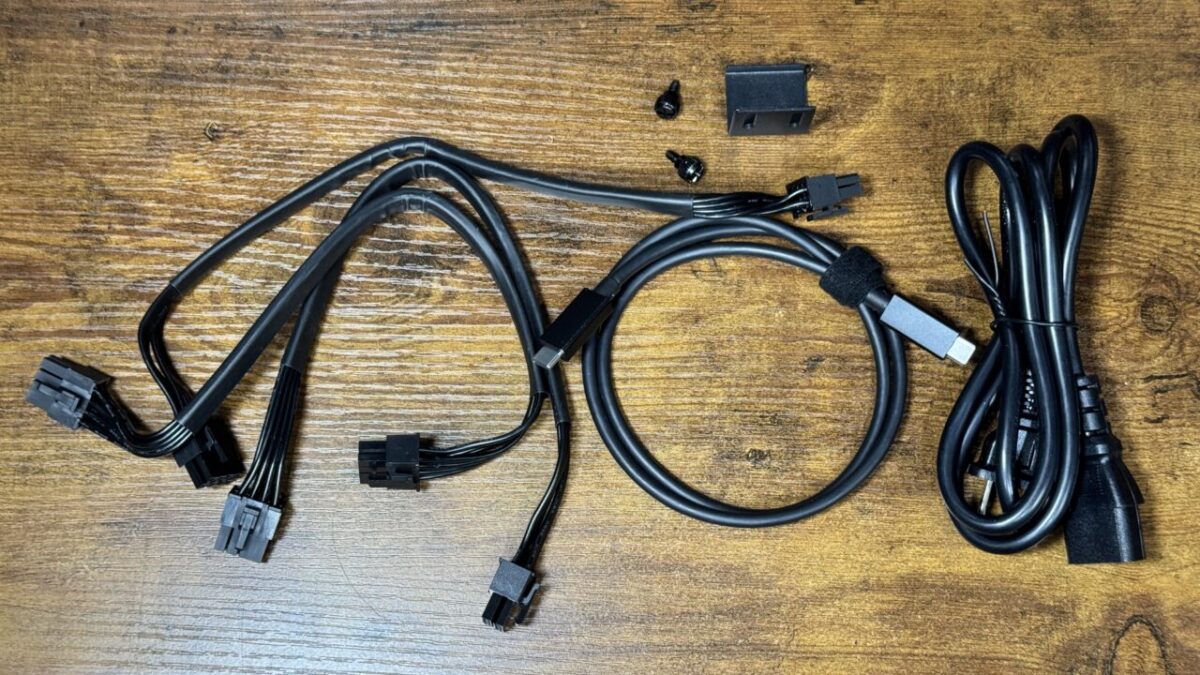
It ships with a GPU power cable, a Thunderbolt 5 cable, and a mains cable. An OCuLink cable is not included, which is worth knowing before you order.
It is a sibling of the AG01 I covered in an earlier article. Here they are side by side.
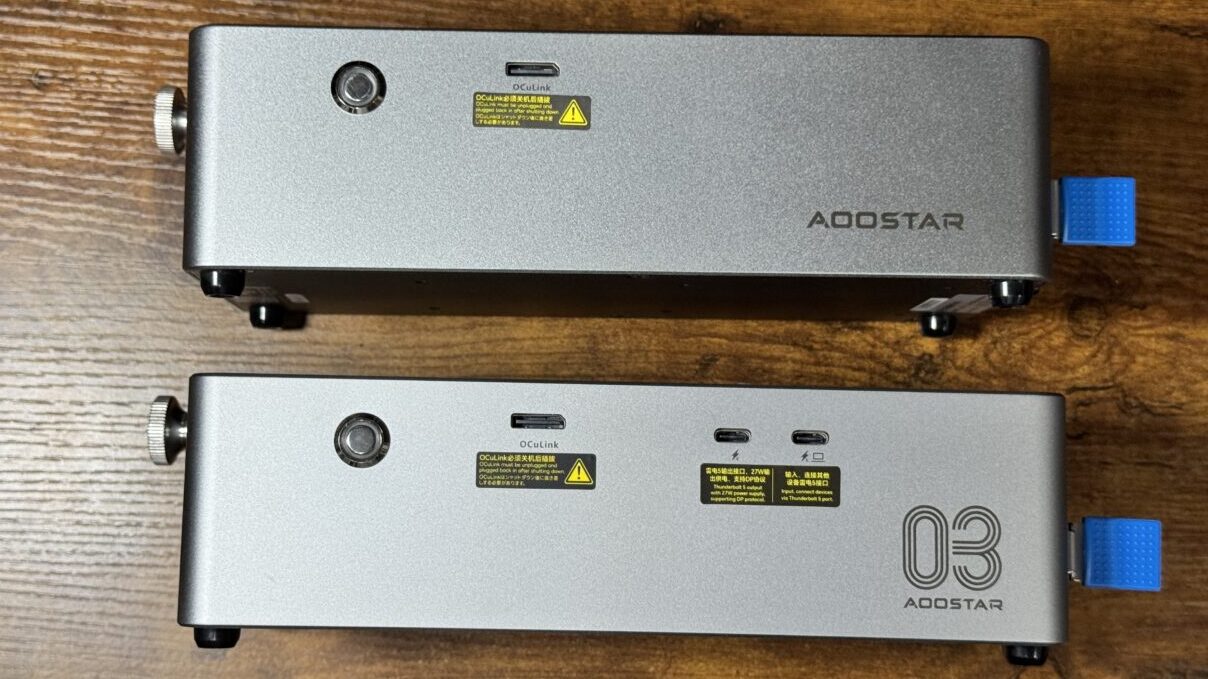
The design is almost unchanged; a USB Type-C port has been added.
Including the third sibling, the AG02, the differences look like this.
| AG01 | AG02 | AG03 | |
| Built-in PSU | 800W | 800W | 800W |
| Supported GPU power | 600W | 600W | 500W |
| OCuLink | Yes | Yes | Yes |
| Thunderbolt | No | TB4 (40Gbps) | TB5 (80Gbps) |
| Thunderbolt power delivery | — | 100W | 140W |
| USB host function | No | No | Yes |
The AG03 supplies slightly less power to the GPU, which is worth noting, but it combines power delivery with a USB host function. For a PC that runs off USB power, the AG03 works as a docking station as well.
Here are all three. I use the AG01 and the AG03; the AG02 is in the table on specifications only — I have not had one in hand (checked 1 August 2026).
AOOSTAR AG01 External Graphics Card Dock (OCuLink)OCuLink only. PSU built in
AOOSTAR AG02 eGPU Dock (OCuLink + USB4, 800W PSU built in)800W PSU built in. Up to 600W GPUs
AOOSTAR AG03 eGPU Dock (OCuLink + Thunderbolt 5)Has both OCuLink and Thunderbolt 5
Why try an external GPU at all?
The EVO-X2 is a mini PC with 128GB of memory, and it has been an excellent everyday machine for local LLMs (large language models — the AI that generates text). Its integrated GPU is a Radeon, though, so anything that needs CUDA — NVIDIA’s compute platform — is off the table.
Hence the question of whether an NVIDIA or Intel GPU can be bolted on externally. The appeal is keeping the convenience of a mini PC while attaching serious GPU power only when it is needed.
The test: three GPU generations down the same path
I connected them through an AOOSTAR AG03 dock, which has both Thunderbolt 5 (referred to below as TB) and OCuLink ports. I started on the TB side, attaching the three cards in turn.
Note that the host port on the EVO-X2 is USB4 (equivalent to Thunderbolt 4, up to 40Gbps). The AG03 supports Thunderbolt 5 (up to 80Gbps), but because the EVO-X2 tops out at Thunderbolt 4 speeds, this test ran at Thunderbolt 4 bandwidth.
- NVIDIA GeForce RTX 5060 Ti — Blackwell generation (2025)
- NVIDIA GeForce RTX 3060 — Ampere generation (2021)
- Intel Arc B580 — Battlemage generation (2024)
For each card I checked, step by step: does PCI see it, can the driver take hold of it, and does computation actually run.
Result: all three stopped, but in three different places
Over TB, none of the three reached the point of computing anything. But each stopped at a different stage.
Same dock, same host: change the generation and the stopping point moves cleanly from “when computing" to “just before initialization" to “at recognition". That lined up with what I found digging afterwards.
Is there something wrong with Thunderbolt?
On a hunch I took the RTX 3060 that had failed over TB and moved it to the OCuLink port on the same AG03 dock. It worked without complaint.
| Item | Over Thunderbolt | Over OCuLink |
|---|---|---|
| PCI recognition | Yes | Yes |
| Driver initialization | Failed | Succeeded |
| nvidia-smi | Not recognized | 12GB recognized |
| VRAM window (BAR) | 256MB | 16GB |
| Actual computation | Never reached | Stable |
The decisive row is the VRAM window — the BAR, the aperture through which the CPU looks into the GPU’s memory. Over TB only 256MB opens. Over OCuLink the full 16GB does.
The feature that opens that window wide is called ReBAR (Resizable BAR). With 12GB of VRAM behind a 256MB window, the driver has no sensible way to work with the memory. Changing nothing but the connection widened the window from 256MB to 16GB — a factor of 64.
I measured the speed of the RTX 3060 once it was running over OCuLink. Here is decode speed — how fast text is generated — for the same model (nemotron-3-nano:4b) on each GPU.
nemotron-3-nano:4b decode speed (tok/s, higher is faster)
RTX 3090 seated directly in a desktop (CUDA), RTX 3060 over OCuLink from the EVO-X2 (CUDA), Arc B580 seated directly in a desktop (Vulkan/Mesa 26.1.5). Measured with Ollama, July 2026.
What stands out is that the RTX 3060 over OCuLink (99.20 tok/s) does not come in below the same 3060 measured earlier in a direct slot (90.6 tok/s). The gap is within what driver versions and host differences explain, so on speed, OCuLink is essentially equivalent to a PCIe slot. Across 20 minutes of monitoring there were zero Xid errors and zero bus disconnects, even under load.
What decides it is the path, not the compatibility list
I compared the three failures against what has been published elsewhere. From here on, this is research rather than my own measurement.
Each stopping point matched a known problem
The RTX 5060 Ti’s behaviour — recognized at idle, instant hang the moment CUDA runs — matches NVIDIA’s open-source driver Issue #979 (an RTX 5080 hard-locking on CUDA operations over a Thunderbolt 5 eGPU) exactly. That report is still open. So this was not me misconfiguring something; it is a known wall on the driver side.
The Arc B580’s GuC initialization failure is an unresolved problem at the kernel frontier, where Thunderbolt’s particular latency causes the exchange with the GPU’s internal microcontroller to time out. The RTX 3060’s recognition failure appears to involve the Linux mechanism that treats externally attached devices as untrusted for security reasons and forces them through the IOMMU — the layer that mediates and protects memory access.
The common thread: ReBAR was not in effect
What all three shared is that over TB the VRAM window stayed pinned at 256MB. The EVO-X2’s BIOS has no ReBAR or Above-4G setting at all. By contrast, when I put the Arc B580 into a PCIe slot on a different machine (the Ryzen 9 3950X desktop), the window opened to the full 16GB and the GPU worked completely.
ReBAR took effect or did not depending on how the card was connected, and that is what separated working from not working. “This GPU is a supported generation, so it should work" does not explain this result. How you connect it mattered more than which GPU you chose.
The OS can change the outcome too
Digging further, I found a third-party report of the same EVO-X2 with a different dock (a MINISFORUM DEG2) and an RTX 5070 Ti working under Windows. The steps involved were disabling fast startup and installing the official driver — no kernel parameters anywhere.
There are also Linux eGPU guides for the EVO-X2 (for Strix Halo platforms generally), and records from people running this configuration successfully. It is not that eGPUs cannot work on this host in principle. What failed here failed under a specific combination of hardware, OS, and dock.
Update (August 2026): things moved on the Mac side
Going back over this after publishing, I found that the Mac situation had changed.
On 31 March 2026, Apple officially approved a driver called TinyGPU. With it, Apple Silicon Macs can drive external NVIDIA and AMD GPUs over Thunderbolt / USB4 — and without turning off System Integrity Protection. It runs on top of DriverKit, a mechanism Apple provides.
| Item | Detail |
|---|---|
| OS | macOS Monterey 12.1 and later |
| NVIDIA | Ampere and later (GeForce RTX 30 series and up) |
| AMD | RDNA 3 and later (Radeon RX 7000 series and up) |
The RTX 3060 and RTX 3090 used in this article are Ampere, so they fall inside that range. The line below where I wrote “the Ampere generation is said to be officially supported" now has something official behind it.
What it can do is narrow, though
This part needs stating precisely. Read it as “external GPUs now work on the Mac" and you will be disappointed.
Everything I measure here runs on Ollama. Not being able to use it means the method in this article does not carry over to the Mac. I cannot line the machines up under the same conditions, so the Mac is not on the comparison table yet.
Even so, an official approval from Apple is not a small thing. The assumption that external GPUs are simply impossible on Apple Silicon has been broken. If the tooling catches up from here, the picture changes.
What this article cannot tell you: the roads not taken
That it did not work here means “not in this configuration", not “cannot be done". People are running eGPUs on the same EVO-X2 under both Linux and Windows. Untried paths remain:
- Isolating it on Windows. I have not compared Linux and Windows on the same host
- A different dock. Something like a Razer Core X V2 is untested
- Another attempt on the Apple Mac mini. Official support landed in March 2026, but for now it only works through tinygrad
These measurements are as of July 2026. This area moves quickly, and the result could be different six months from now.
In summary: what failed was the path, not the GPU generation
Three GPU generations over Thunderbolt, none of them working in this configuration. Honestly, a disappointing result.
There was something to take away, though. Moving the same RTX 3060 to the OCuLink side of the same dock widened the VRAM window from 256MB to 16GB and gave stable performance equal to a direct slot. If you want an external GPU that actually works on an EVO-X2 today, OCuLink is the reliable path.
As for Thunderbolt, there are roads I have not walked yet.
- Isolating it under Windows (comparing Linux and Windows on the same machine)
- Trying again with a different dock (a Razer Core X V2, for instance)
- Another attempt on the Apple Mac mini (as noted in the update above, official support landed in March 2026 — though for now it is limited to tinygrad)
People are running eGPUs on this same EVO-X2, under both Linux and Windows. What happened here is “it did not work in this configuration", not “it cannot work". I will keep looking into external GPUs on both the EVO-X2 and the Mac mini. As it turns out, the Mac side moved not long after this article went up (see the update above). Ending on a note that leaves room for a follow-up sits better with me anyway.
Sources
Hardware used in this test
GMKtec EVO-X2 (Ryzen AI Max+ 395 / 128GB / 2TB)128GB unified memory mini PC
AOOSTAR AG03 eGPU Dock (OCuLink + Thunderbolt 5)Has both OCuLink and Thunderbolt 5