Oculus Rift S Price Drop: Rechecking How Light It Really Is on Your GPU
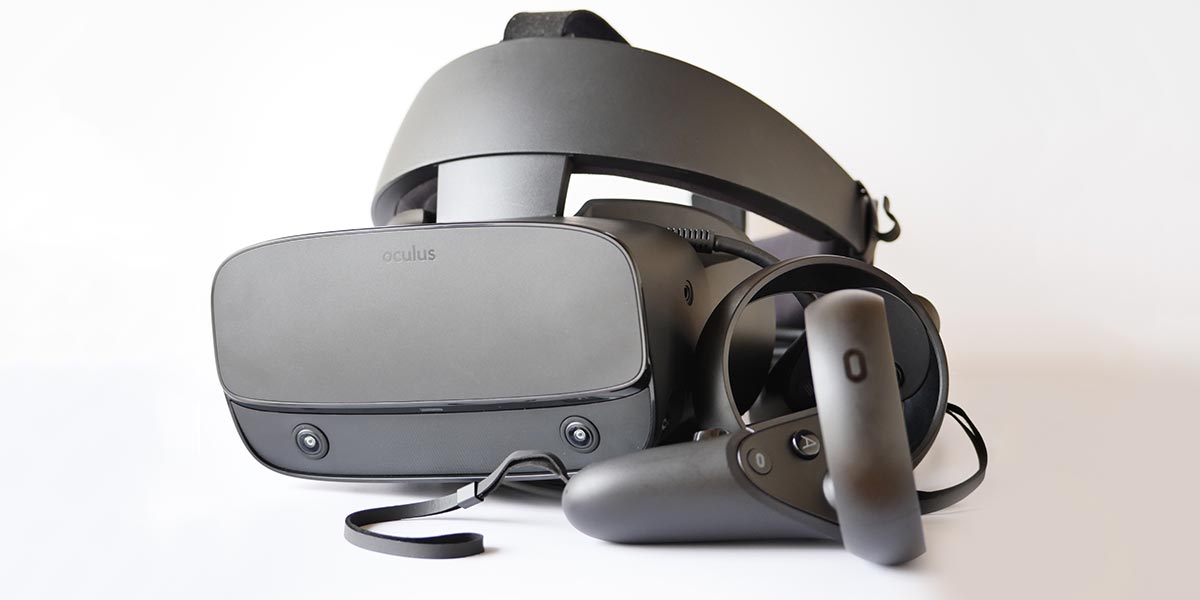
The Oculus Rift S, a PC-tethered HMD (head-mounted display), just got a price cut. Does that change whether it’s still worth buying?
The tax-included price dropped from ¥54,780 to ¥32,780 — a roughly 40% cut that amounts to a fire sale.
I’ve always liked the Rift S for one reason in particular: it’s easy on your PC’s hardware. So with the price this low, I wanted to re-check exactly how light its load is, broken down by GPU.
What the Oculus Rift S Is
The Rift S is a PC-tethered HMD that Facebook released in April 2020.
It uses five onboard tracking cameras, so compared to the Oculus Quest line, its controllers are far less likely to drift out of tracking and fly off in the wrong direction.
It’s well built, it’s light, and it doesn’t demand much from the PC driving it — which is why it’s remained one of my go-to headsets.
The display is an LCD panel. The screen-door effect is far less noticeable than on the original Oculus Quest, though a bit more visible than on the Quest 2.
The image looks crisp and text is easy to read, which makes it comfortable for productivity use as well as gaming.
Once you’ve looked through a Rift S screen, going back to Oculus Link on a Quest headset feels noticeably softer and hazier by comparison.
Will Supported Apps Dry Up?
Facebook announced back in 2021 that the Oculus Rift S would be discontinued, which naturally raises a worry: will the list of officially supported apps just keep shrinking?
It’s true that fewer apps will likely be built with the Rift S specifically in mind going forward.
That said, the Rift S runs the same Oculus app store as the Oculus Quest 2, and on top of that it’s also fully compatible with SteamVR.

 https://store.steampowered.com/app/330050/Main_SteamVR/
Even in the unlikely event that Rift S-specific titles disappear from the Oculus store entirely, the headset can still run apps built for the Vive line and the Valve Index, so a shortage of playable content isn’t something to worry about.
Test Setup: Frame Rates by GPU, Lighter Than the Quest Line
So, 40% off is a great deal, but is a headset that Facebook has already announced it will discontinue in 2021 actually worth buying today?
Opinions will differ, but personally, I think it’s worth it as long as you’re treating it as a secondary headset — the appeal is “light on hardware, still looks sharp."
Let’s put that to the test by rounding up frame rates by GPU across the laptops I’ve benchmarked so far.
First, here’s a quick reference table of each headset’s refresh rate and the quality setting used for these measurements.
| HMD | Refresh rate | Setting used |
| Oculus Rift S | 80Hz | Quality prioritized |
| Oculus Quest | 72Hz | Render resolution 1.0x |
| Oculus Quest 2 | 72–90Hz | Render resolution 1.0x |
| Vive Cosmos Elite | 90Hz | Supersampling 100% |
If the measured frame rate is equal to or higher than a headset’s refresh rate, that headset is running comfortably at that setting.
Beat Saber
Beat Saber is the classic example of a lightweight VR title. Every GPU in this test cleared its headset’s refresh rate, so any PC with these GPUs runs it comfortably.
Beat Saber Frame Rate by GPU (Laptops)
Beat Saber Frame Rate by GPU (Laptops) (Series 2)
What stands out here is the Rift S’s own frame rate. Even paired with a lower-power GPU, it still comes out ahead — a bit higher than the numbers I’ve measured on the Oculus Quest and Quest 2. In other words, the Rift S simply asks less of the PC than the other headsets do.
Asgard’s Wrath
For a heavyweight title, I tested Asgard’s Wrath with its in-game graphics quality set to “High."
Asgard's Wrath Frame Rate at High Quality by GPU (Laptops)
This result makes the difference obvious.
Remember, the Rift S’s refresh rate is 80Hz. Looking at those numbers again against each headset’s own refresh rate, only the Rift S clears its target with room to spare — it’s the only one of the four that renders this app without dropping frames.
When you’re running something this demanding, that’s exactly where the Rift S’s light footprint pays off.
I’ve also written up how well VR runs on various laptops more broadly, in case that’s useful.
What I Could Not Verify Here
These numbers come from the specific laptop and driver combinations I had on hand at the time, so a different chassis, power profile, or driver version could shift the results somewhat. I also only tested Beat Saber and Asgard’s Wrath — a more demanding title could still push even the Rift S past its refresh rate.
In Summary: Still Worth It as a Second Headset
The Oculus Rift S just dropped in price by around 40%. Given that Facebook has already flagged 2021 as its end-of-life year, I wanted to re-confirm whether it’s still worth buying today, and revisited what makes it worth owning.
・Five onboard cameras mean tracking rarely drops out
・Sharp, crisp image quality
・Easy to hit high frame rates
Among current PC-tethered HMDs, the Rift S is about as light on hardware as it gets. It runs comfortably even on entry-level gaming laptops.
Not tying up a lot of your PC’s power just to render the display actually matters quite a bit if you’re using the headset alongside something like video editing — your main task stays responsive instead of slowing to a crawl.
As a step up from an Oculus Quest, or as an affordable secondary PC headset, the Rift S still seems worth picking up.
One thing to check if you’re stepping up from an Oculus Quest: make sure your PC’s DisplayPort output is actually recognized. This isn’t specific to the Rift S — no PC-tethered HMD will work if DisplayPort isn’t detected.
And if you don’t already own anything in the Quest lineup, the Oculus Quest 2 is the safer pick. For about ¥5,000 more than the Rift S, you get a standalone headset that also works as a PC-tethered HMD — solid value either way.