How Sharp Can a 3D Scene Get from Old VR180 Footage (Vuze XR)? Comparing Training Steps and Settings in Spirula Studio
How sharp can a 3D scene get when it is built from footage shot in 2019 with an old VR180 camera (the Vuze XR)? The camera is not current and the pixel count is small by today’s standards.
In this article I used Spirula Studio (software that builds a 3D scene from video or photos) to make a 3D Gaussian Splatting (3DGS) scene from a video of a road at Tofuku-ji in Kyoto (VR180 format, 5760×2880), and compared how it looks as I changed the number of training steps and the settings. I judged the results by how fine they look (crispness of detail, blur, and how few floating bits remain), not by the pixel count of the output.
This is the state as of October 18, 2026. The measurements were finished by the morning of October 18.
- 1. Purpose: what I wanted to find out
- 2. Method
- 3. Result 1: number of training steps
- 4. Result 2: changing one setting at a time
- 5. Result 3: the highest-quality build
- 6. Result 4: floaters (debris left in the air)
- 7. Result 5: person masks and opacity regularization
- 8. Discussion: what the results suggest
- 9. Limitations: what this test cannot tell you
- 10. Summary: what raised the quality and what did not
Purpose: what I wanted to find out
- Show how much detail 3DGS can recover from old footage in the 5.7K class.
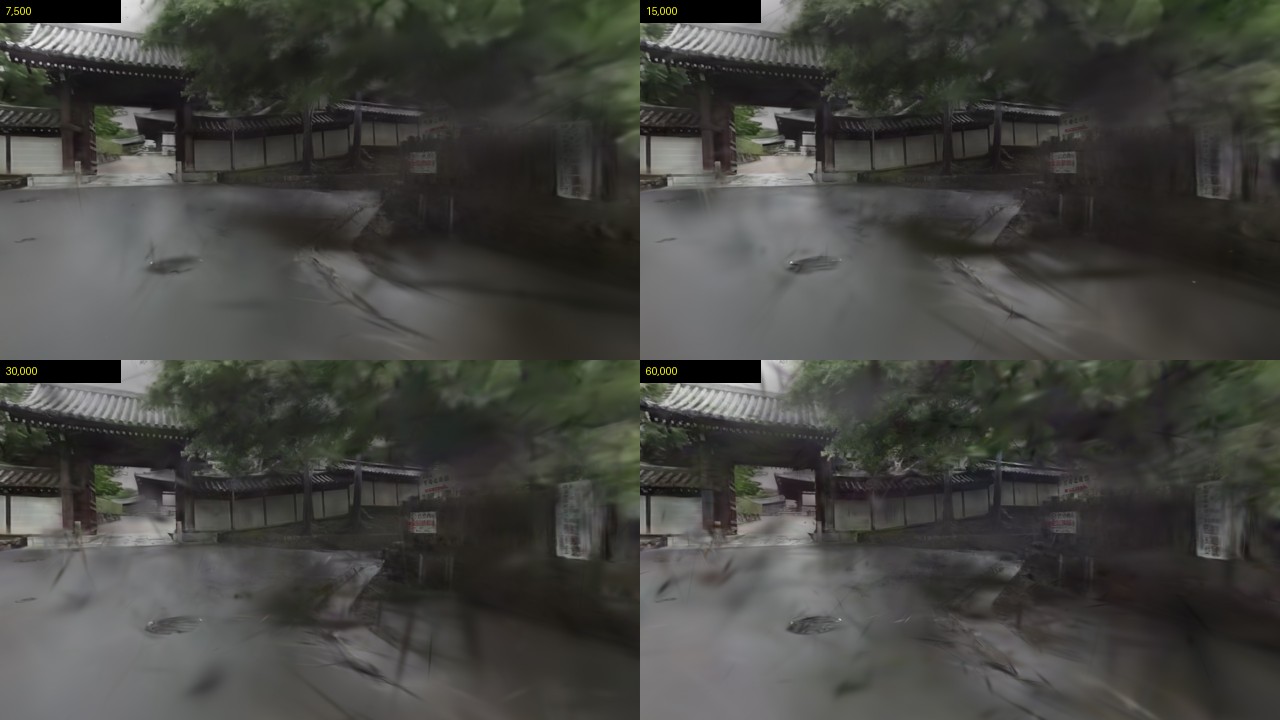
- See how much finer the scene gets with 7,500, 15,000, 30,000 and 60,000 training steps.
- Change one setting at a time to find what affects crispness and floaters (the leftover “debris" in the air).
Method
The source is 45 seconds of a VR180 (side-by-side, 5760×2880) video shot in 2019. The camera was a Vuze XR, confirmed from my shooting records. The Vuze XR is a “2-in-1" VR camera that can shoot both 360° and 180° 3D. In my earlier comparison table on this blog it is listed as shooting 5.7K (5760×2880) at 30 fps. I cut out the left-eye image (2880×2880), converted it into pinhole images in three directions (60° left, front, 60° right; 90° field of view, 1280×1280), and took two frames per second, 270 images in total. People appear only small, and no faces are visible.
- Software: Spirula Studio 2026.9.24 (the version was not changed during the work). Camera poses with
sfm auto, training withtrain 3dgs. - Machine: EVO-X2 (Radeon 8060S, unified memory). I changed one setting at a time.
- Rendering: from each trained scene I made a 1280×720, 30 fps video along the same camera path, a straight forward move along the road (constant height, looking in the direction of travel, constant speed).
- Judging the look: I compared enlarged crops of the same spots (pine needles, the text on a sign board, the edge of roof tiles) by eye.
- PSNR is the average of the last 30 per-image values during training. It fluctuates a lot, so treat it as a reference only, and do not compare it across settings that use different source images.
Result 1: number of training steps
| Steps | Training time | Splats | PSNR (reference) |
|---|---|---|---|
| 7,500 | 3 min 17 s | 1,000,000 | 22.44 |
| 15,000 | 7 min 37 s | 1,000,000 | 23.52 |
| 30,000 (default) | 16 min 05 s | 1,000,000 | 25.57 |
| 60,000 | 32 min 36 s | 1,000,000 | 25.66 |
Up to 30,000 steps, more steps give a crisper look. From 30,000 to 60,000 steps PSNR barely changes (25.57 to 25.66) and the visible difference is small, while the time doubles.
Result 2: changing one setting at a time
| Setting | Training time | Splats | Look |
|---|---|---|---|
Learned sky background (--background-mode sh) | 16 min 52 s | 1,000,000 | No big difference in the pine-needle crop |
Sky mask, ignored (--apply-loss-for-mask 0) | 18 min 42 s | 1,000,000 | No big difference |
Sky mask, treated as empty (--apply-loss-for-mask 1) | 15 min 21 s | 1,000,000 | Worse: the sky turned black and the roof edge broke up |
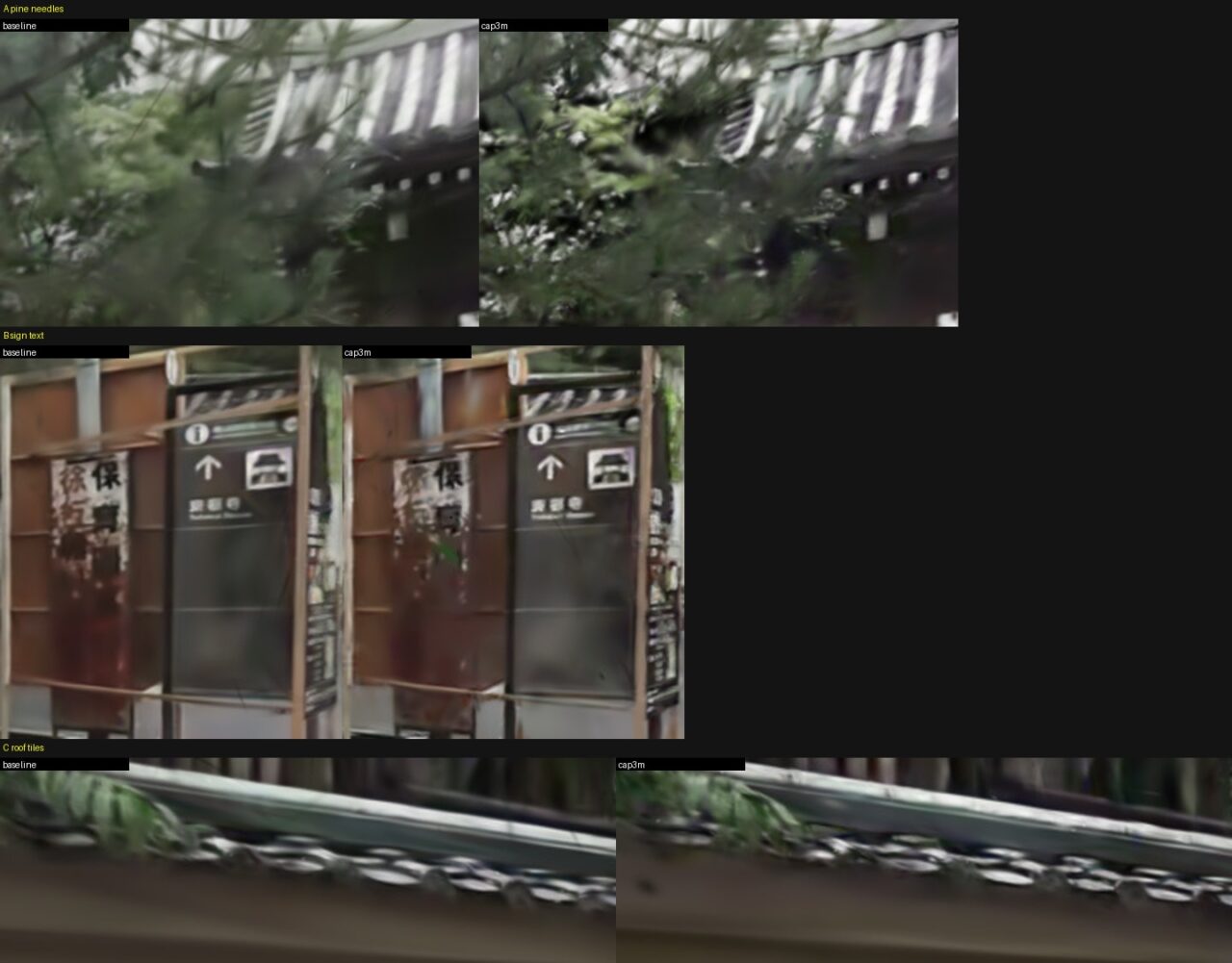
Splat cap 3 million (--cap-max 3000000) | 34 min 29 s | 3,000,000 | Clearly more detail in pine needles and sign text (the biggest effect) |
--quality high | 35 min 03 s | 3,000,000 | Same tendency as raising the cap |
| Source images cut at 1920×1920 | 28 min 56 s | 1,000,000 | Slightly crisper than the baseline, small difference |
| Pinhole field of view 60° (about 1.7× pixel density) | 15 min 49 s | 1,000,000 | Slightly crisper than the baseline, small difference |
--floater-suppression strong | 18 min 11 s | 1,000,000 | No notable difference |
--densify-score-mode max | 16 min 36 s | 1,000,000 | No notable difference |
--train-resolution-divisor 2 | 10 min 23 s | 1,000,000 | Faster to train, slightly softer |
The biggest effect came from raising the cap on the number of splats. The floater-suppression setting (strong) had no notable effect on this footage.
Result 3: the highest-quality build
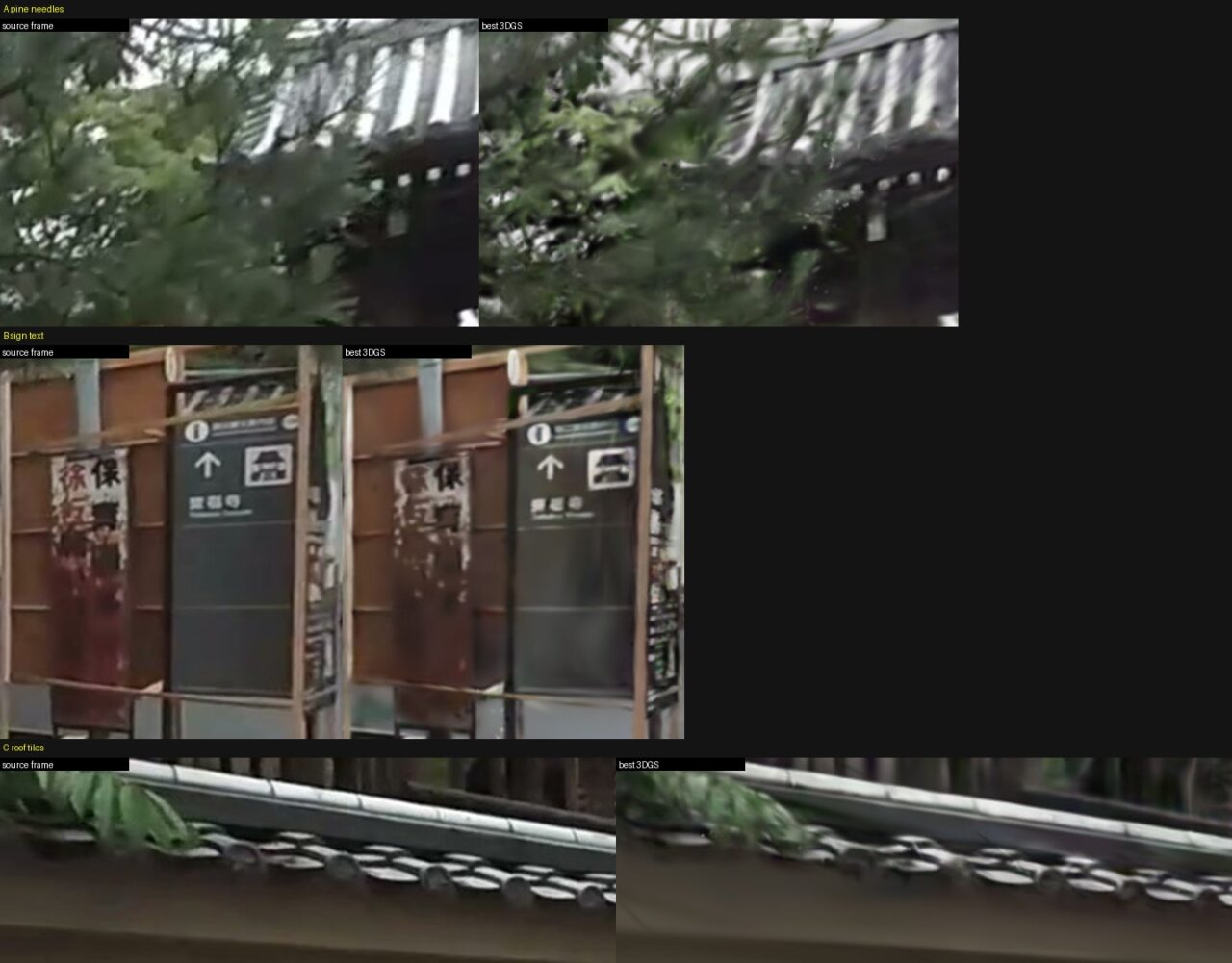
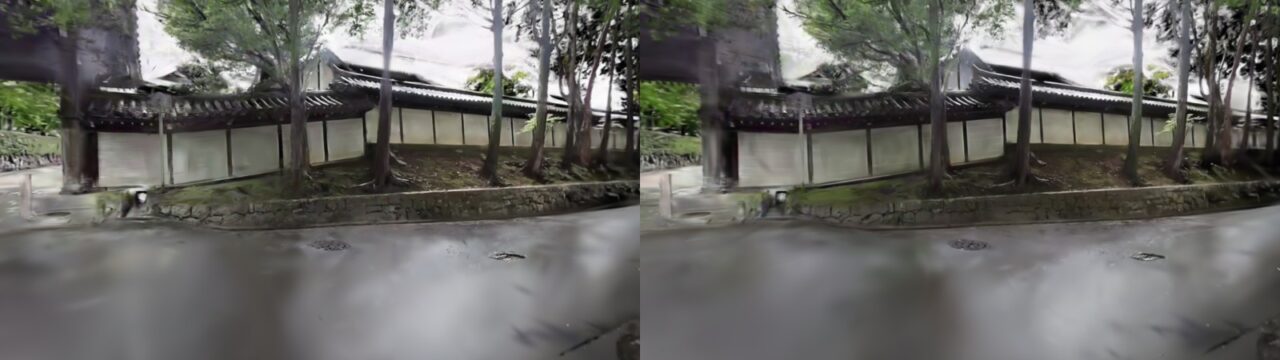
I trained for 30,000 steps with 1920×1920 source images, a 3-million splat cap and --quality high. Training took 54 min 37 s and the file is 705 MB. Roof tile edges and pine needles came close to the detail of the original video frame. The thin text on the sign board was blurrier than in the original frame, and some small floating dots remained.
Result 4: floaters (debris left in the air)
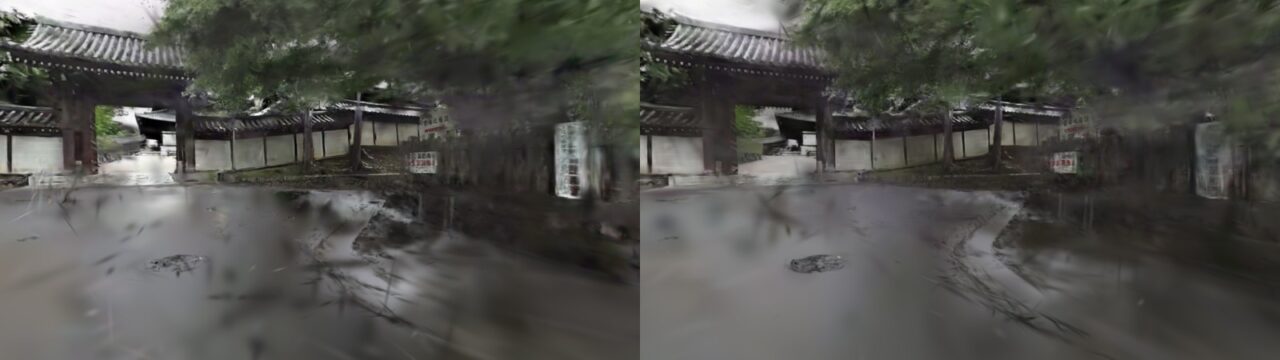
Shadow-like smears remain on the road. I think they are traces of passers-by who moved, so their positions did not agree between views.
- I tried a clean-up after training that removes points with low opacity, points that are too large and points far from the camera positions. A light clean-up (about 130,000 points removed) changed almost nothing. A heavy one (about 1.1 million removed) made holes and dark lumps on the road and made it worse. These floaters are not the kind that disappear by deleting faint points.
- I also tried training while ignoring people, masked with SAM 3 image by image. 114 of the 270 images contain a person, and the masked area averages 0.39%.
Result 5: person masks and opacity regularization
| Setting (added to the highest-quality build) | Training time | Look |
|---|---|---|
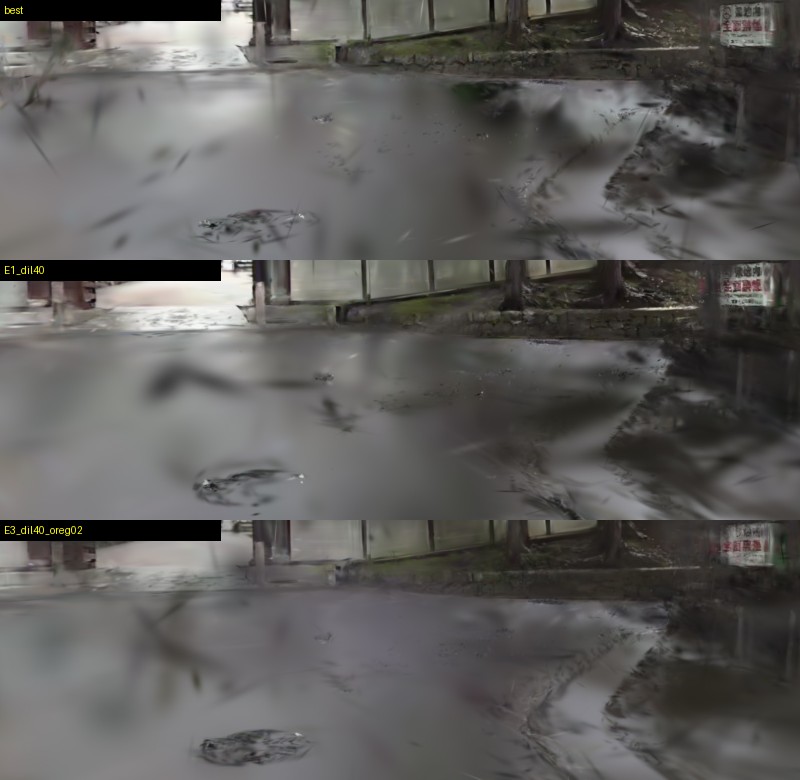
| Ignore person masks (grown by 40 px) | 55 min 35 s | Black streaks on the road decrease. Dark blurry lumps remain |
| Ignore person masks (grown by 100 px) | 53 min 45 s | Streaks decrease further, but the foreground becomes a dark haze, which is worse |
| 40 px + opacity-reg 0.02 (4× the default 0.005) | 58 min 58 s | Best. The road ghosts drop a lot and the manhole cover is crisp |
| 40 px + opacity-reg 0.05 | about 60 min | Smoother road, but the wall and sign fade |
| 40 px + floater-suppression mild | about 60 min | More branch-like blur, worse |
| 40 px + opacity-reg 0.02 + distraction-robustness mild | about 60 min | Darker than the best, small difference |
The most effective combination was the person masks (grown by 40 px) together with an opacity regularization four times the default. If the mask is grown too much, fewer views see that area and the foreground ends up as a dark haze.
Discussion: what the results suggest
- Even old footage in the 5.7K class gives fine roof tiles and leaves once the splat count is raised. Thin text is still blurrier than in the source image.
- 30,000 steps were enough. The cap on the number of splats mattered more than the number of steps.
- Part of the shadows on the road came from moving passers-by, and the person masks reduced the black streaks. I think the remaining dark haze comes from few views of the junction surface (not enough coverage).
Limitations: what this test cannot tell you
- One source video and one place. The ranking may differ for other footage.
- The look was judged by eye. The only number is the PSNR during training, which is a reference value.
- The camera (Vuze XR) was confirmed from my shooting records. I did not read the metadata of the video file this time.
- Each time is a single measurement.
Summary: what raised the quality and what did not
From old footage, raising the splat cap and cutting the source images larger kept details such as roof tiles and leaves in the 3D scene. The traces of passers-by did not disappear with a clean-up after training. Combining person masks with a stronger opacity regularization cut the road ghosts a lot. The dark haze on the junction surface and the blurred thin text remain.