What the Intel Arc B580 Could and Could Not Do | Intel Arc B580 Local LLM Part 7
I put a 12GB Intel Arc B580 in next to the NVIDIA GeForce RTX 3090 I already had, and spent about a month measuring it. At first it was so slow that the whole thing started as a hunt for the cause. Then the PCIe reading gave me a fright, and speed turned out to swing with model size and context length.
So was the Intel Arc B580 a usable card for local AI in the end? And where it did not work, was the card simply not fast enough? This article looks back over five rounds of measurement, sorted into what worked, what did not, and why. It is the last part of the series.
As of July 2026.
The previous article is here

 https://kimono-oyaji.com/en/arc-b580-mixed-gpu-vulkan-en/
- 1. The machine
- 2. What worked: the things the B580 ran
- 3. What did not work
- 4. Why the failures happened
- 5. What it suits, and what it does not
- 6. On value: B580 or RTX 3060 12GB?
- 7. What this series cannot tell you: six months could change it
- 8. In summary: with a current driver, it is straightforward within 12GB
- 9. Sources
- 10. Hardware used
The machine
| CPU | Ryzen 9 3950X |
| Motherboard | X570 |
| Memory | 64GB |
| GPU | RTX 3090, Intel Arc B580 (added for this series) |
| OS | Ubuntu |
Kuroutoshikou Intel Arc B580 GDDR6 12GB (AR-B580D6-E12GB/DF)
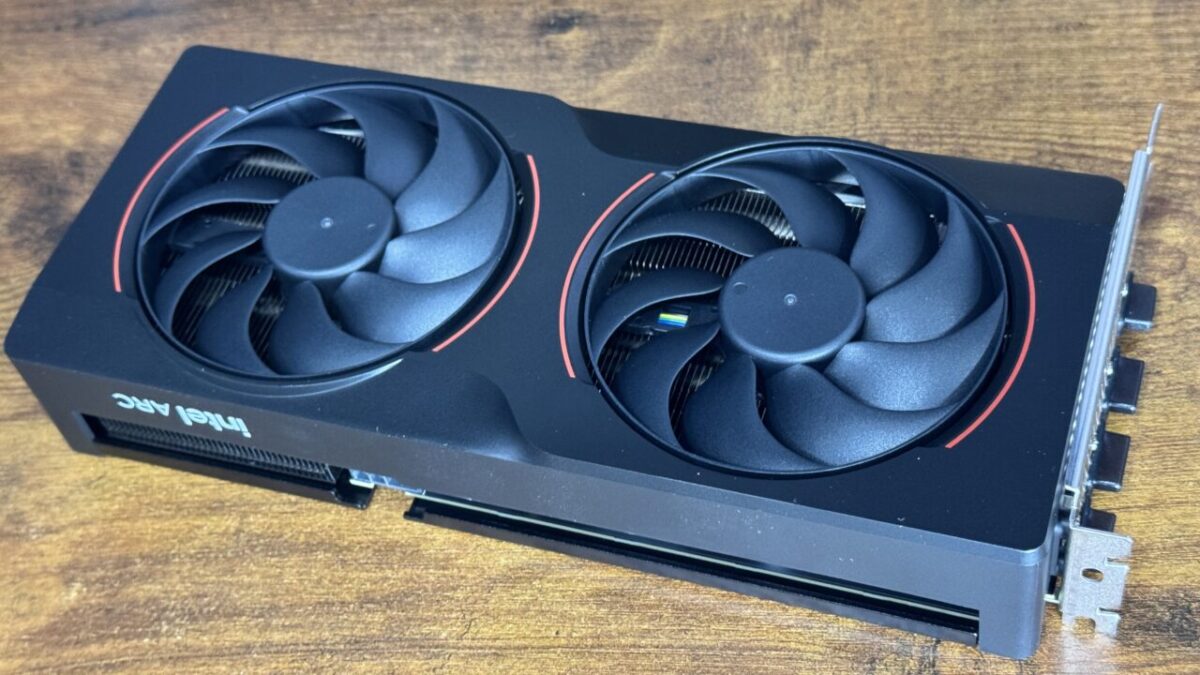
A very plain-looking card with two fans. The question was how far one of these gets you with local LLMs.
As an Amazon Associate we earn from qualifying purchases.
What worked: the things the B580 ran
One driver generation was worth 3.3x
The first decode speed I measured was 28.52 tok/s, nowhere near the 90.6 tok/s of the RTX 3060 sitting in the same house. The cause was that Mesa, the Linux graphics driver, was one generation behind. After updating it went to 94.69 tok/s.
For models that fit in 12GB, it sits above an RTX 3060
Re-measured after the driver update, the same model gave 94.69 tok/s on the B580 against 90.6 tok/s for the RTX 3060 (CUDA). On small models prefill reached 2,380 tok/s, so there is almost no sense of waiting.
| Model | Size | decode | prefill |
|---|---|---|---|
| phi4-mini | 2.4GB | 79.81 tok/s | 2,380 tok/s |
| nemotron-3-nano:4b | 2.4GB | 95.52 tok/s | 1,650.8 tok/s |
| qwen3:8b | 4.5GB | 60.08 tok/s | 1,192.9 tok/s |
| Ornith-1.0-9B | 4.7GB | 48.03 tok/s | 1,163.4 tok/s |
| gemma4-12b | 6.9GB | 29.95 tok/s | 396.9 tok/s |
There is a condition attached to these numbers. They were measured by repeating the same prompt. Send the same question again and the already-read portion is reused, so prefill comes out fast.
You will not see these speeds if every input is different. Summarizing long documents or reading code means re-reading the input each time, and the wait for the first reply is longer than the table suggests. On another machine of mine, pushing input to 30,000-token scale stretched time-to-first-token to over 30 seconds.
It ran without CUDA
Intel GPUs have no CUDA, so I ran everything through Vulkan. Comparing on the same RTX 3090, CUDA gave 181.41 tok/s and Vulkan 167.57 tok/s — a difference of 7.6%.
The “Gen1 x1" reading was cosmetic
The tool that shows the connection reported PCIe 1.0 x1, and I suspected a fault. Intel’s own support documentation states that Arc cards always report this through standard tools. It was actually running at PCIe 4.0 x4, which I confirmed by measuring transfer speed.
What did not work
Long contexts slow it down abruptly
Even with the model itself inside 12GB, stretching the context (the length of the conversation or document) cost speed. With qwen3:14b, 36.11 tok/s at a context of 2048 fell to 9.00 tok/s at 32768 — the KV cache holding the context no longer fits in VRAM and spills to the CPU.
| Context | qwen3:14b | gemma4-12b |
|---|---|---|
| 2048 | 36.11 tok/s | 30.54 tok/s |
| 8192 | 28.64 tok/s | 30.51 tok/s |
| 16384 | 13.83 tok/s | 30.50 tok/s |
| 32768 | 9.00 tok/s | 30.57 tok/s |
In the same 12GB, gemma4-12b held around 30 tok/s at every context length. That models differ this much in how much KV cache they consume was the biggest surprise of the whole series.
Note that this is less about capacity than about how the KV cache is held. Settings that compress it, or improvements on the model side, leave room here. It is not a settled ceiling.
Models over 12GB will not load
12GB of VRAM is 12GB. Trying to load a 30B-class model pushes most of it to the CPU and the speed leaves the realm of the usable. Against a 24GB RTX 3090, the range of models you can handle is clearly different.
It would not work externally over Thunderbolt
I tried attaching it to a mini PC. Over a Thunderbolt dock, GPU initialization failed at the last stage and never reached computation. The same dock over OCuLink worked, so the deciding factor was the connection, not the GPU generation.
Every point of failure was in an area drivers and the kernel are still working on. Nothing was ruled out as impossible by specification, so updates may well change this. Part 1 of this series was exactly that story: a newer driver fixed it.
What I have not tried yet
Running the B580 and the RTX 3090 together, splitting one model across both, was still unconfirmed when I wrote this. Different vendors means CUDA cannot bind them, so the plan was to split layers over Vulkan; it stalled at the preparation stage for want of a required file. (This has since been measured — see Part 6.)
Why the failures happened
| What did not work | Reason | Outlook |
|---|---|---|
| Slow at first | Software support lagged (the B580 is a late-2024 product and its optimizations reached Mesa late) | Already fixed by an update; more room to grow as drivers improve |
| Slow at long contexts | The KV cache does not fit in VRAM and spills to the CPU | May improve with cache compression settings or model-side changes |
| Large models will not load | 12GB of VRAM, full stop | Capacity cannot change; but quantization progress changes what counts as “fits" |
| Will not work over Thunderbolt | GPU initialization and dock response timing; the kernel side is unsettled here too | Driver and kernel updates may make it work |
Laid out like this, the only failure that is genuinely a hardware limit is VRAM capacity. The rest are software circumstances, where time may still help.
And even capacity is not fixed: what fits inside the same 12GB gets better every year. As quantization improves, sizes that did not fit last year fit this year. What 12GB can do is not decided the day you buy the card.
One more reason that does not show up in numbers: the tooling around local LLMs is built assuming NVIDIA’s CUDA. More things run on Intel and AMD GPUs than before, but there is far less information to fall back on when something breaks.
What it suits, and what it does not
| Suits | Does not suit |
|---|---|
| Running small to mid-size models that fit in 12GB at decent speed | Feeding it long documents (long-context work) |
| Short back-and-forth usage (prefill is fast) | Running 30B-class models |
| Working on Linux without being tied to CUDA | Attaching it externally to a mini PC over Thunderbolt |
One weak point: it draws 34W doing nothing at all. For a card left permanently connected, that idle draw is worth planning for.
On value: B580 or RTX 3060 12GB?
The question I kept coming back to was how it compares with the NVIDIA GeForce RTX 3060 12GB — same VRAM, similar price. I have both, so here are numbers from the same machine.
| Model | Intel Arc B580 | RTX 3060 12GB | Difference |
|---|---|---|---|
| phi4-mini | 79.81 tok/s | 97 tok/s | B580 17.7% slower |
| nemotron-3-nano:4b | 95.52 tok/s | 90.6 tok/s | B580 5.4% faster |
| qwen3:8b | 60.08 tok/s | 61 tok/s | Level |
| Ornith-1.0-9B | 48.03 tok/s | 49 tok/s | Level |
| Average of four | 70.86 tok/s | 74.40 tok/s | 3060 5.0% faster |
Wins swap around by model, and on average the 3060 is slightly ahead. In Part 1 I looked at a single model (nemotron-3-nano:4b) and wrote that the B580 beat the 3060; widening the sample lands them close to level. The B580 has more memory bandwidth (456 GB/s vs 360 GB/s), so it is not simply raw specification.
I excluded qwen3:14b from this comparison because the context-length conditions were not matched when it was measured.
Prices
These are researched, not measured, as of July 2026. Used prices vary, so treat them as a guide.
| Product | Condition | Approximate price |
|---|---|---|
| Intel Arc B580 (the AR-B580D6-E12GB/DF used here) | New | ≈¥48,000 |
| NVIDIA GeForce RTX 3060 12GB | New | ≈¥39,000 |
| NVIDIA GeForce RTX 3060 12GB | Used | ≈¥20,000–39,000 (typically around ¥30,000) |
Generation speed per ¥10,000 (higher is better value)
Average decode across four models ÷ price. Speeds measured on the same machine; prices researched July 2026.
On these results, for the specific purpose of running local LLMs, the RTX 3060 12GB is the better value. Four reasons:
- Speed is level. On average the 3060 is slightly ahead, and the B580 does not produce a gap large enough to overturn the price difference.
- It costs about ¥10,000 less. Used, the gap widens.
- CUDA works. One card covers the rest of the local AI toolchain too — ComfyUI for image generation, for instance. The B580 runs through Vulkan, and some tools still do not support it.
- It is harder to trip over. Out of the box on Ubuntu, the B580’s driver was old enough to give a third of its real speed. The 3060 needed none of that preparation.
Reasons to pick the B580 anyway
That said, the B580 is not simply the losing option. The 3060 is years old; new stock is thin and the market is mostly used, with the usual worries about warranty and history. The B580 is current, buyable new, and comes with a warranty.
The other reason is headroom. In Part 1, one driver generation was worth 3.32x. Optimization for the B580 is still ongoing, and future updates may change this comparison. The 3060 is mature; there is not much left to unlock.
In short: the 3060 if you want something that works today; the B580 if you want to buy new, or are willing to travel with the improvements. Whether you need CUDA-dependent tools is the other deciding question.
What this series cannot tell you: six months could change it
These results are as of July 2026 and no later. Most of what did not work failed on the software side rather than the card side. Part 1 is the clearest case: the cause was a Linux driver one generation behind.
So the numbers can change as software moves. That applies to external GPUs over Thunderbolt and to speed at long context alike. Repeating the same measurements in six months could well produce a different conclusion.
One configuration was measured. A B580 seated directly in a desktop (X570, Ryzen 9 3950X), plus the external setup on the EVO-X2. Other machines may differ.
Some things are still open. Splitting a model across two GPUs, and speed-ups from configuration, are things I am still looking into. When the situation changes I will remeasure under the same conditions and record it.
In summary: with a current driver, it is straightforward within 12GB
With a current driver, the Intel Arc B580 runs local LLMs straightforwardly within its 12GB. Looking at that first 28.52 tok/s I thought I had wasted my money; the cause was not the card but a Linux driver one generation behind.
On the other side, going past 12GB and attaching it externally over Thunderbolt were both out of reach in this setup. But what the series showed is that most of the reasons for failure sat in the surrounding software, not in the card.
So I regard these results as a snapshot of July 2026. External Thunderbolt, long-context speed — both could read differently after more updates. Running the same measurements in six months and getting a different conclusion is entirely plausible.