What Happens If You Mix GPUs From Different Vendors? RTX 3090 + Intel Arc B580 Measured | Intel Arc B580 Local LLM Part 6
This desktop has an NVIDIA GeForce RTX 3090 (24GB of VRAM) and an Intel Arc B580 (12GB) in it. One NVIDIA, one Intel — different manufacturers. Add them up and that is 36GB, but can two cards from different vendors actually work together?
This article records what I measured: how speed changes when both are used at once, and whether the answers stay correct.
As of July 2026.
The previous article is here

 https://kimono-oyaji.com/en/egpu-thunderbolt-three-gpus-en/
- 1. The machine
- 2. Can an RTX 3090 and an Arc B580 work together? Why CUDA is out
- 3. Rebuilding llama.cpp for Vulkan: three places I got stuck
- 4. Does splitting across two make it faster? Measuring the cost of splitting
- 5. How should you split, and in what ratio?
- 6. A model that fits in 24GB: not splitting was faster
- 7. What happens with a longer context? The benefit disappears
- 8. A model too big for 24GB: here, mixing finally earns its place
- 9. Do the answers change when you mix? Checking correctness
- 10. When is mixing actually worth it?
- 11. What this article cannot tell you: one pairing only
- 12. In summary: not “add them up and go faster", but “add them up and it fits"
- 13. Sources
- 14. Hardware used
The machine
| CPU | Ryzen 9 3950X |
| Motherboard | X570 |
| Memory | 64GB |
| GPU | Two cards: RTX 3090 (24GB) and Intel Arc B580 (12GB) |
| OS | Ubuntu |
| Inference | llama.cpp (Vulkan build) |
Kuroutoshikou Intel Arc B580 GDDR6 12GB (AR-B580D6-E12GB/DF)
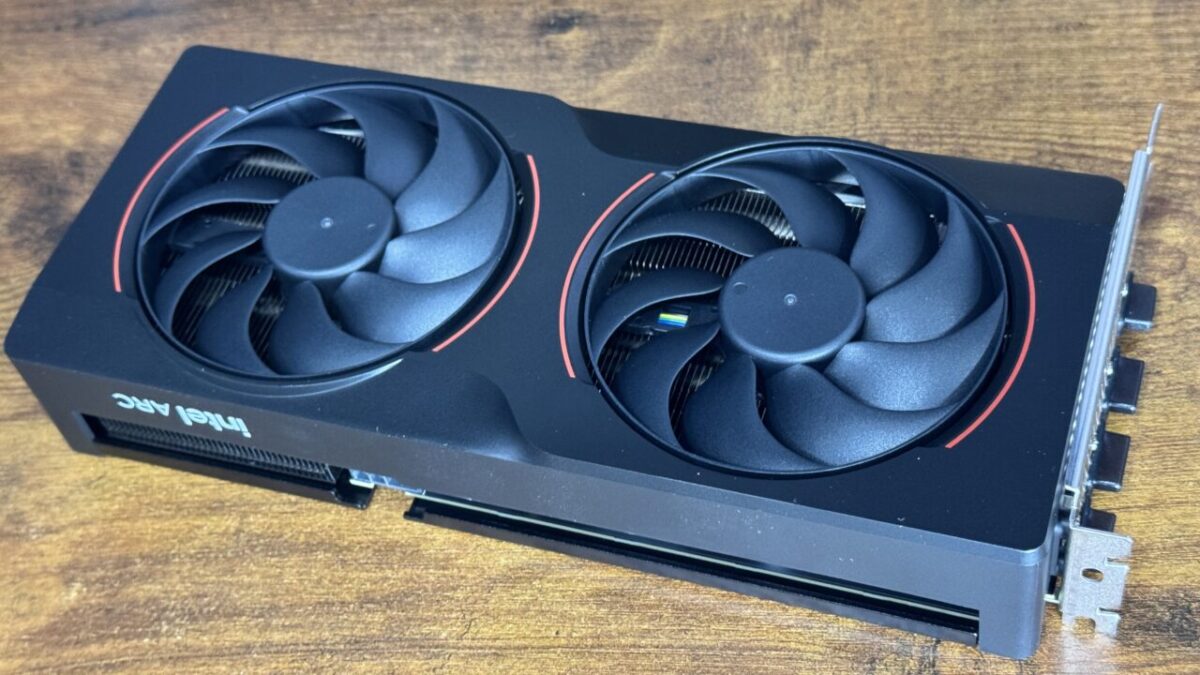
A card with 12GB of VRAM. Here it works alongside the RTX 3090.
As an Amazon Associate we earn from qualifying purchases.
NVIDIA GeForce RTX 3090 (24GB VRAM)
The other card is the RTX 3090 I have used for a while. 24GB of VRAM, and the faster of the two here. It has been out for years and new stock is thin — mostly used now — but 24GB is still very much current.
Can an RTX 3090 and an Arc B580 work together? Why CUDA is out
CUDA, the usual way to compute on NVIDIA GPUs, is NVIDIA-only. The Intel Arc B580 has no CUDA, so these two cannot be bound together through it.
Vulkan, on the other hand, works across NVIDIA, AMD and Intel alike. So I used Vulkan to split one model across both GPUs.
There are several ways to split. The main one here is layer splitting: cut the model’s layers in order and put the first part on one GPU and the rest on the other. Processing runs in sequence, so while the slower GPU is working on its stretch, the faster one waits.
Rebuilding llama.cpp for Vulkan: three places I got stuck
Running this needs llama.cpp rebuilt with Vulkan support. I got stuck three times, so here they are for anyone doing the same.
- You need SPIRV-Headers. The configure step stops if it cannot find them. On Ubuntu they ship as
spirv-headers. - Too new a version will not build. If you install SPIRV-Headers from source, the newest version has changed its internal naming and the llama.cpp build fails. Use the version matching your Vulkan SDK generation (
vulkan-sdk-1.4.309.0here). - Where you put it matters. If SPIRV-Headers are installed somewhere non-standard, the build configuration finds the headers but does not pass the location on to the compiler. Setting the
CPATHenvironment variable fixes it.
Once built, you can list the GPUs it sees.
Vulkan0: Intel(R) Arc(tm) B580 Graphics (BMG G21) (12216 MiB)
Vulkan1: NVIDIA GeForce RTX 3090 (24576 MiB)
Two cards from different vendors, lined up on the same footing. So far so good.
Does splitting across two make it faster? Measuring the cost of splitting
First, a model small enough to run comfortably on either card alone (qwen3:8b, 4.86GiB), across three conditions — isolating the cost of splitting itself.
| Condition | Generation speed |
|---|---|
| RTX 3090 only | 117.91 tok/s |
| Split across both | 67.66 tok/s |
| Intel Arc B580 only | 48.64 tok/s |
qwen3:8b generation speed (tok/s, higher is faster)
RTX 3090 + Intel Arc B580 / llama.cpp Vulkan build / 5 runs each. Measured July 2026.
Splitting landed exactly between the two. Faster than the B580 alone, but 43% slower than the 3090 alone. With layer splitting the work runs in sequence, so the B580’s slower stretch drags on the whole thing.
Two cards does not mean the speeds add up.
How should you split, and in what ratio?
You can specify how much goes to each GPU. I assumed the capacity ratio (12GB vs 24GB, so 1:2) would be optimal and worked outwards from there.
| B580 : 3090 allocation | Generation speed |
|---|---|
| 1 : 1 | 60.33 tok/s |
| 1 : 2 (capacity ratio) | 64.36 tok/s |
| 1 : 3 | 73.31 tok/s |
| 1 : 4 | 78.10 tok/s |
| 1 : 6 | 78.80 tok/s |
My assumption was wrong. Rather than the capacity ratio, the less you give the B580, the faster it goes. A blunt result: the less work the slow GPU gets, the faster the whole thing runs. Unless you need every byte of capacity, keep the slower card’s share small.
There are also different split methods, so I compared those too.
| Split method | Generation speed |
|---|---|
| By layer (default) | 66.72 tok/s |
| By row | 67.08 tok/s |
| By tensor | 25.45 tok/s |
Only tensor splitting collapsed. At 25.45 tok/s it is slower than the B580 on its own (48.64). Two GPUs, and slower than the slower one alone. When mixing vendors, do not pick this method.
I also tried designating which GPU is primary: 69.41 vs 68.48 tok/s, a difference within measurement noise.
A model that fits in 24GB: not splitting was faster
Next, a model that fits in the 3090’s 24GB but not the B580’s 12GB (19.70GiB, 34.66B). The B580 cannot load it, so this compares the 3090 alone against the split.
| Condition | Generation speed |
|---|---|
| RTX 3090 only | 155.35 tok/s |
| Split across both | 103.67 tok/s |
| Intel Arc B580 only | Cannot load (does not fit in 12GB) |
Splitting is slower again, by 33%. If it fits on one GPU, there is no reason to split. Adding the B580 simply holds it back.
What happens with a longer context? The benefit disappears
Everything above used short exchanges. Real use means long documents and continuing conversations, so I measured again across context lengths.
First, the 19.70GiB model:
| Context length | RTX 3090 only | Split | Difference |
|---|---|---|---|
| none | 155.35 tok/s | 103.67 tok/s | −33% |
| 8192 | 150.15 tok/s | 72.83 tok/s | −51% |
| 32768 | 128.35 tok/s | 43.83 tok/s | −66% |
The longer the context, the worse splitting looks. The 3090 alone drops about 20% (155 to 128), while the split falls by more than half (103 to 43).
And compared against the B580 alone? Using qwen3:8b, which fits on either card, at the same context lengths:
| Context | RTX 3090 only | Arc B580 only | Split | Split vs B580 alone |
|---|---|---|---|---|
| none | 117.91 | 48.64 | 67.66 | +39% |
| 8192 | 99.81 | 33.04 | 50.02 | +51% |
| 32768 | 69.18 | 16.94 | 18.16 | +7% |
Generation speed at context 32768 (tok/s)
qwen3:8b / llama.cpp Vulkan build / 5 runs each. Measured July 2026. Split = by layer, 1:2 allocation.
At short contexts the split ran about 40% faster than the B580 alone. Stretch to 32768 and that shrinks to 7%. You are adding a 24GB RTX 3090 and ending up barely faster than the B580 on its own. It never actually loses, but at long contexts the benefit of mixing effectively disappears.
A model too big for 24GB: here, mixing finally earns its place
So far splitting has lost every time. What about a model that does not fit in the 3090’s 24GB either? I tried llama3.3:70b (39.59GiB, 80 layers).
It does not fit in the combined 36GB either. Whatever does not fit is processed on the CPU, so how many layers you can put on GPUs decides the speed. I loaded as many layers as each configuration allowed.
| Condition | Layers on GPU | Generation speed |
|---|---|---|
| RTX 3090 only | 46 / 80 | 1.91 tok/s |
| Split across both | 69 / 80 | 3.33 tok/s |
llama3.3:70b (39.59GiB) generation speed (tok/s)
Maximum layers each configuration could hold on GPU. llama.cpp Vulkan build / 3 runs each. Measured July 2026.
Layers on GPU went from 46 to 69, up 50%, and generation speed rose 74%. Fewer layers falling to the CPU, straightforwardly faster. The B580’s 12GB finally did some work.
That said, 3.33 tok/s is the speed where you read along as it types. Not comfortable. But next to 1.91 tok/s it does feel different.
Do the answers change when you mix? Checking correctness
Enough about speed. There was one more thing to check: when layers are split across GPUs from different vendors, does the answer itself change? Intel computes the first half, NVIDIA the second — is there room for the results to diverge?
I prepared 8 reasoning problems and 10 coding problems and ran them on both the 3090 alone and the split configuration.
| Condition | Reasoning (8) | Coding (10) |
|---|---|---|
| RTX 3090 only | 8 / 8 | 10 / 10 |
| Split across both | 8 / 8 | 10 / 10 |
All 18 matched. Splitting across different-vendor GPUs did not change the answers. Speed suffers, but correctness does not. There is no need to be nervous about splitting as such.
When is mixing actually worth it?
| Model size | Result of splitting |
|---|---|
| Fits on the faster GPU alone | Slower (−33 to −43%). Do not split |
| Does not fit on one, but fits across two | No alternative — splitting is the only way to run it |
| Does not fit across both either | Faster (+74%), because more layers land on GPUs |
Mixing is not a way to go faster — it is a way to get more capacity. Add a second card hoping for speed and you will get the opposite.
Also worth remembering: the benefit thins out with long contexts. At 32768 the split was only 7% ahead of the B580 alone. For long-document work, picking a model that fits on one fast GPU is the more realistic move.
Note that this was mainly layer splitting over Vulkan. Results change with the method and the settings, and Vulkan optimization is ongoing, so treat these numbers as a snapshot.
What this article cannot tell you: one pairing only
Only one pair was tested: an RTX 3090 (24GB) and an Intel Arc B580 (12GB). Whether other vendor combinations, or two cards of similar capacity, behave the same way is unchecked.
Only Vulkan was used. Binding two cards through SYCL or ROCm was not measured.
These figures are as of July 2026. Multi-GPU handling is still changing on the llama.cpp side, so the numbers can move.
Output correctness was checked only on a limited set of prompts. The same answers came back, but I did not follow how longer generations might drift.
In summary: not “add them up and go faster", but “add them up and it fits"
Two GPUs from different manufacturers can work together through Vulkan, and correctness holds.
On speed, though, one card wins as long as the model fits on it. Splitting only pays when the model is too big for a single card’s VRAM. Give the slower card less, and avoid the tensor split method.
If you have two GPUs of different capacities, think “together they hold a bigger model" rather than “together they go faster", and you will use them in the right places.