AMD Published Everything About This Model — So Could I Train It Myself? Instella-MoE on a Mini PC
In July 2026 AMD released Instella-MoE, its first fully open MoE model. What stands out is how much they opened up: not just the finished weights, but the checkpoints from every stage of training, the training code, and the training data itself. If it is all out there, could I follow the steps and build one myself?
So I opened the config files AMD published to see the actual scale of the training run, and then looked at what my own AMD mini PC could do with the result.
As of July 2026.
- 1. The machine
- 2. What did AMD actually release?
- 3. Could I train it myself? Reading the config to find the scale
- 4. Can I at least run it? A 128GB mini PC has room to spare
- 5. Can I run it easily? Most of the usual roads are missing
- 6. What does “fully open" mean here? Comparing the licenses
- 7. What I learned about building one
- 8. Actually running it: which precision, and how fast?
- 9. Where my expectations were wrong
- 10. Was “the context area should stay cheap" right?
- 11. What tripped me up before it ran
- 12. About the heat
- 13. If it is slow at home, you can rent instead
The machine
The star of this one is a mini PC with an AMD chip in it.
| Model | GMKtec EVO-X2 (referred to below as the EVO-X2) |
| CPU | AMD Ryzen AI Max+ 395 |
| GPU | Radeon 8060S (integrated) |
| Memory | 128GB (unified memory) |
| OS | Ubuntu |
Unified memory means the CPU and GPU share a single pool. Unlike a graphics card with a fixed amount of VRAM, that works in your favour when you want to load something big.
GMKtec EVO-X2 (Ryzen AI Max+ 395 / 128GB / 2TB)
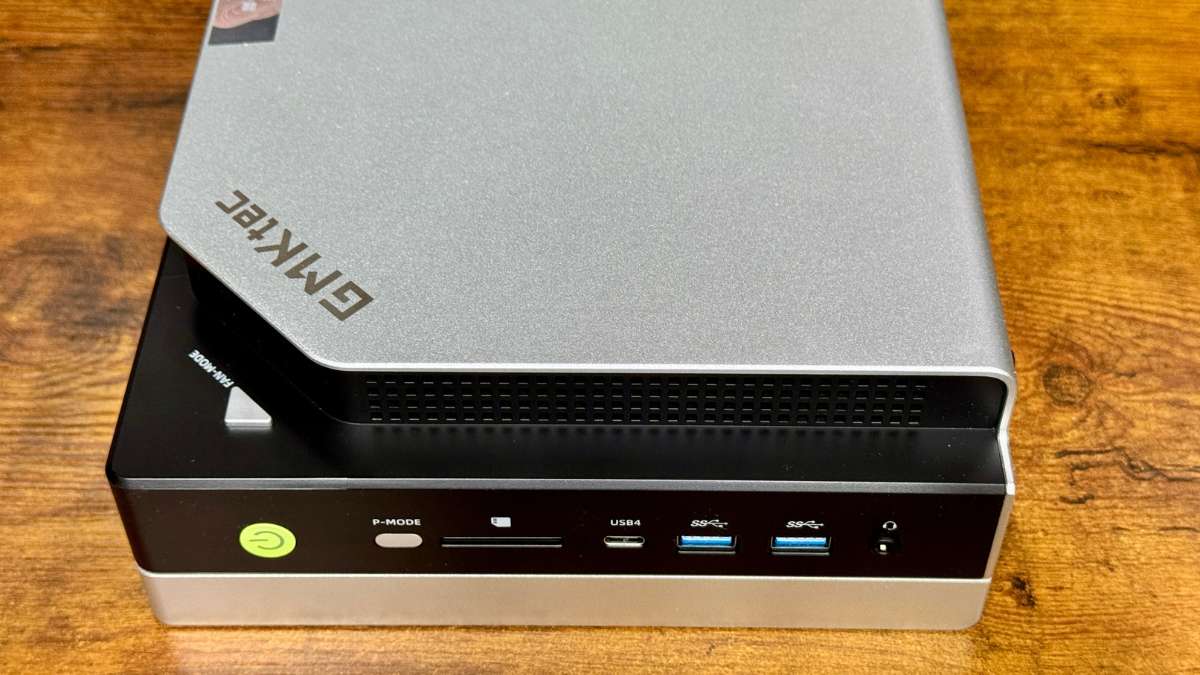
A box a little larger than your palm. Since the question here is “can an AMD chip run a model AMD built", this machine is the one on stage.
GMKtec EVO-X2 (Ryzen AI Max+ 395 / 128GB / 2TB)128GB unified memory mini PC
As an Amazon Associate we earn from qualifying purchases.
What did AMD actually release?
First, what “fully open" covers. The model is 16B parameters, of which only 2.8B are active at any time — a MoE (mixture of experts) design.
| What was released | Details |
|---|---|
| Weights at each training stage | Six stages: pre-training → mid-training → long-context → supervised fine-tuning → preference learning → final |
| Training code | MIT license |
| Training data | Actually downloadable. About 42.5TB in total |
| Config files | The settings used at each stage |
Publishing six intermediate checkpoints is the unusual part. Rather than handing out only the finished article, they let you trace how it grew.
Could I train it myself? Reading the config to find the scale
If the steps are public, following them should produce the same thing. So I checked what scale we are actually talking about, straight from the published configs.
The pre-training config contains these values.
train_iters: 443876
global_batch_size: 4096
seq_length: 4096
expert_model_parallel_size: 8
Multiply the first three and you get the number of training tokens: 443,876 × 4,096 × 4,096, or about 7.45 trillion tokens. Tens of millions of paperbacks’ worth of text.
And the last line is the wall for an individual. expert_model_parallel_size: 8 means the work is split across 8 GPUs. That value is not just in the pre-training config — it appears the same way in mid-training, in supervised fine-tuning, in preference learning, in every published stage. There is no single-machine configuration.
The GPUs AMD trained on were MI300X and MI325X — data-centre parts. The Radeon 8060S in my EVO-X2 is also AMD, but it exists for a completely different purpose. A rough estimate says running the same training on this integrated GPU would take several hundred years.
On top of that the training data is 42.5TB. You also need somewhere to put it after tokenizing, so the working disk alone runs to tens of terabytes. Both the connection and the storage are beyond what an individual can carry.
Incidentally, AMD has not published how many GPUs they used, for how long, or at what cost. The config let me work backwards to the token count, but how much compute actually went in remains unknown.
So the answer to “can I build it by following the steps" is no. Not because AMD is hiding anything — the scale is simply on a different order.
Can I at least run it? A 128GB mini PC has room to spare
Building it is out. What about running it? This is where the EVO-X2’s memory earns its keep.
| Format | Size | EVO-X2 (practical ceiling ≈90GB) |
|---|---|---|
| BF16 (as released) | 31.7GB | Fits with room to spare |
| Compressed to 8-bit | ≈16GB | Fits |
| Compressed to 4-bit | ≈9GB | Fits |
Even uncompressed it is 31.7GB, so 128GB of unified memory leaves plenty of headroom. You can run it without giving up any quality.
The area that holds the context looks cheap too. This model compresses the memory it keeps as it reads, so a long context should not eat much. (That was a guess from the documentation — I check it later in this article.)
Can I run it easily? Most of the usual roads are missing
Having established there is room, the next wall appeared. Almost none of the usual ways to run it exist.
| Way to run it | Available? |
|---|---|
| Ollama | No |
| llama.cpp | No (the conversion step does not support it) |
| A GGUF file | Does not exist (not even one made by a third party) |
| transformers (Python) | This one works |
Most people reach for Ollama when running a model locally. Not here — llama.cpp, which sits underneath it, does not support this model’s format.
Converting it yourself does not work either, because the conversion tool’s list of supported models does not include it. A clean illustration that “the model fits" and “the model is usable" are two different things.
That leaves calling it directly from Python’s transformers library. Less convenient than Ollama, but it does run.
One trap worth knowing about
This model’s config file internally carries the name of a different model format. Which means that with a small edit to the config, you can push it through the conversion tool.
The problem is that this model has its own additional mechanism, and if you edit and convert, that part is silently dropped. No error appears, so the conversion looks like it succeeded — but what comes out is a model with a piece missing. It runs, but not at its real quality.
“The conversion went through" does not mean “the conversion was correct". Worth remembering.
What does “fully open" mean here? Comparing the licenses
One more thing I wanted to check: the license.
| Model | License | Commercial use |
|---|---|---|
| Instella-MoE | Research-only RAIL | Not permitted (academic and research use only) |
| OLMo 3 | Apache-2.0 | Permitted |
| Moonlight | MIT | Permitted |
The training code is MIT and free to use, but the weights are restricted to research. You cannot use them at work.
OLMo 3, which also flies the “fully open" flag, is Apache-2.0 with no restriction on commercial use. What “open" covers depends on who is publishing. Instella-MoE opens more of the process; OLMo 3 lets you do more with the result.
What I learned about building one
The answer to “if it is all published, can I build it myself" was no. 7.45 trillion tokens of training, a config that assumes 8 GPUs sharing the work, 42.5TB of data. A different order of magnitude.
That does not make the release pointless. With six intermediate checkpoints available, building from zero is out of reach, but the door to modifying what already exists is open. That, I think, is the practical value of what AMD did here.
On the running side, a 128GB mini PC has room to spare. Though with neither Ollama nor llama.cpp available, the road is narrow. We are not yet at the point where this is convenient.
Everything up to here came from reading published material. From here on it is a record of actually running it on the EVO-X2.
Actually running it: which precision, and how fast?
transformers is the only road, so I set up a Python environment and measured across three precisions (as-is, 8-bit, 4-bit), at two context lengths.
| Condition | Detail |
|---|---|
| Machine | GMKtec EVO-X2 (Ryzen AI Max+ 395 / 128GB unified memory), integrated GPU |
| Model | Instella-MoE-16B-A3B-Think (final-stage weights) |
| Method | 5 repetitions per condition, first discarded, median reported (range noted) |
| Generation | 128 tokens per run |
| Date | 29 July 2026 |
Results
| Condition | Memory used | Reading in (tok/s) |
Writing out (tok/s) |
Power avg / peak |
Peak temp |
|---|---|---|---|---|---|
| As-is (BF16) / context 4096 | 29.6GB | 882 | 5.33 | 77W / 100W | 83°C |
| As-is (BF16) / context 32768 | 37.8GB | 3,038 | 4.59 | 84W / 98W | 90°C |
| 8-bit / context 4096 | 15.3GB | 726 | 4.35 | 79W / 109W | 96°C |
| 4-bit / context 4096 | 9.1GB | 333 | 7.73 | 84W / 113W | 98°C |
Loading took around 10.6 seconds in every condition.
The limits of this measurement (an honest note)
These numbers come with the following caveats. Discount them accordingly.
- Only 128 tokens were generated per run. Each run finishes in about 24 seconds, so whether speed falls off over a long session was not observed.
- Starting temperature was not equalized between conditions. Heat from the previous run carried over; start temperatures varied from 42°C to 68°C.
- Each condition was measured in a single session. Whether the order of measurement affected the results was not checked.
- Context 32768 was only measured uncompressed. 8-bit and 4-bit were measured at context 4096 only.
A re-run that closes these gaps is planned. If the numbers change, I will add a note to this article.
Where my expectations were wrong
Before measuring, I assumed the compressed versions would not run at all — there were reports that the component used for compression fails to load on this AMD GPU.
In fact both 8-bit and 4-bit ran normally. The reported fault did not apply to this combination.
The other surprise was speed. The most compressed version, 4-bit, was faster than the uncompressed one — 7.73 against 5.33 tok/s, about 40% quicker.
Uncompressed, that means re-reading 29.6GB; at 4-bit it is 9.1GB. Cut the amount you have to read to a third and it moves that much faster. The arithmetic did not get smaller — the load being carried did.
In the other direction, reading the prompt in (the “reading in" column above) got slower with compression: 882 down to 333 tok/s. That step processes everything at once, and the cost of unpacking the compression is added on top.
Was “the context area should stay cheap" right?
Earlier in this article I wrote that this model compresses the memory it keeps as it reads, so long contexts should not eat much. That was a guess from the documentation, so I checked it.
I stretched the context from 4096 to 32768 — 8× — and watched how memory grew.
| Context length | Memory used |
|---|---|
| 4096 | 33.0GB |
| 32768 (8×) | 37.8GB |
| Increase: 4.8GB | |
Eight times the context for 4.8GB more memory. The guess was right. With 128GB of unified memory there is plenty of room to stretch the context.
Writing speed fell from 5.33 to 4.59 tok/s — a drop of about 10%.
What tripped me up before it ran
It did not run smoothly. The first two attempts would not even start.
The cause was the config file I mentioned earlier. Because it internally carries the name of a different model format, a newer version of transformers reaches for its own implementation of that name rather than the dedicated code shipped with the model. The insides differ, so of course it stops.
The fix was simple: drop transformers back one version. The older version does not carry that implementation, so the model’s own code gets used.
I did not take that road. I downgraded instead.
About the heat
The compressed conditions reached 96–98°C, above the 83–90°C of the uncompressed run. With a lighter load to carry, the arithmetic packs together and flows, which is the likely reason.
These were measurements of a few minutes each, so it was not a problem here. For long continuous runs, though, plan for that level.
If it is slow at home, you can rent instead
4-bit gave 7.73 tok/s. It runs, but you wait. It is the speed where you sit and watch the text appear.
At 31.7GB this model is far smaller than the frontier ones, so renting a single data-centre GPU runs it comfortably. There are times when renting by the hour beats grinding away locally — especially if all you want to know is whether this model suits your purpose. Rent, check, done.
One such service is RunPod.
RunPod (rent a GPU by the hour)