The Mini PC Lid Would Not Close — I Tried Three M.2-to-OCuLink Adapters
A while back I wrote about pulling an OCuLink port out of the M.2 slot inside a GMKtec EVO-X2 (from here on, EVO-X2) mini PC with an adapter, and hanging an external graphics card off it. It worked, but one thing kept bothering me. The lid would not close.
Back then I ended the article with “some cutting will be needed, or a different adapter." Since then I tried a third adapter, and the lid closed with no cutting at all. The homework from last time has an answer, so here is a short record of it.
This is where things stood in August 2026.
The previous article is here.
 https://kimono-oyaji.com/en/egpu-minipc-5060ti-2/
Where do you get that thick cable out of the case?
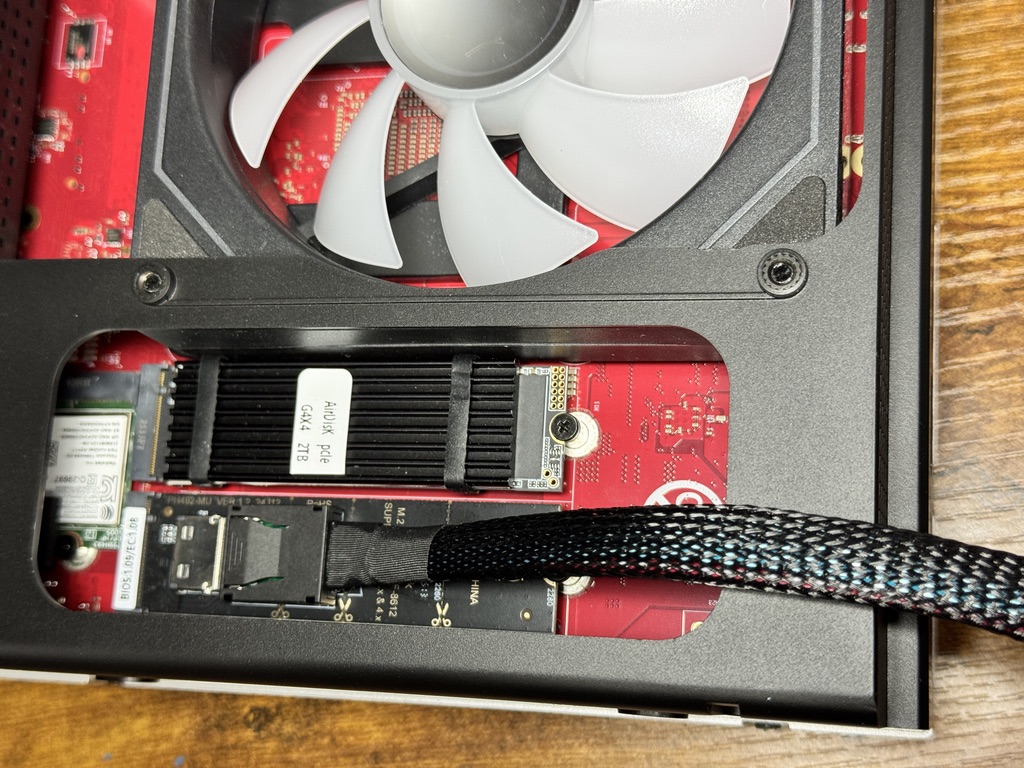
The mini PC has no OCuLink port. You open the case, fit an adapter into the internal M.2 slot (where an SSD normally goes), and make an OCuLink port yourself.
The photo shows the problem. When the port is mounted directly on the adapter board, the port sits at a fixed position inside the case. There is nowhere for the thick cable coming off it to pass through. That is why the lid sat proud and would not close.
| Machine | GMKtec EVO-X2 (Ryzen AI Max+ 395 / 128GB unified memory) |
| How it connects | Internal M.2 slot → adapter → OCuLink cable → docking station |
| External GPU | NVIDIA GeForce RTX 3060 12GB |
What changes if the port itself can move?
This is the third one I tried.
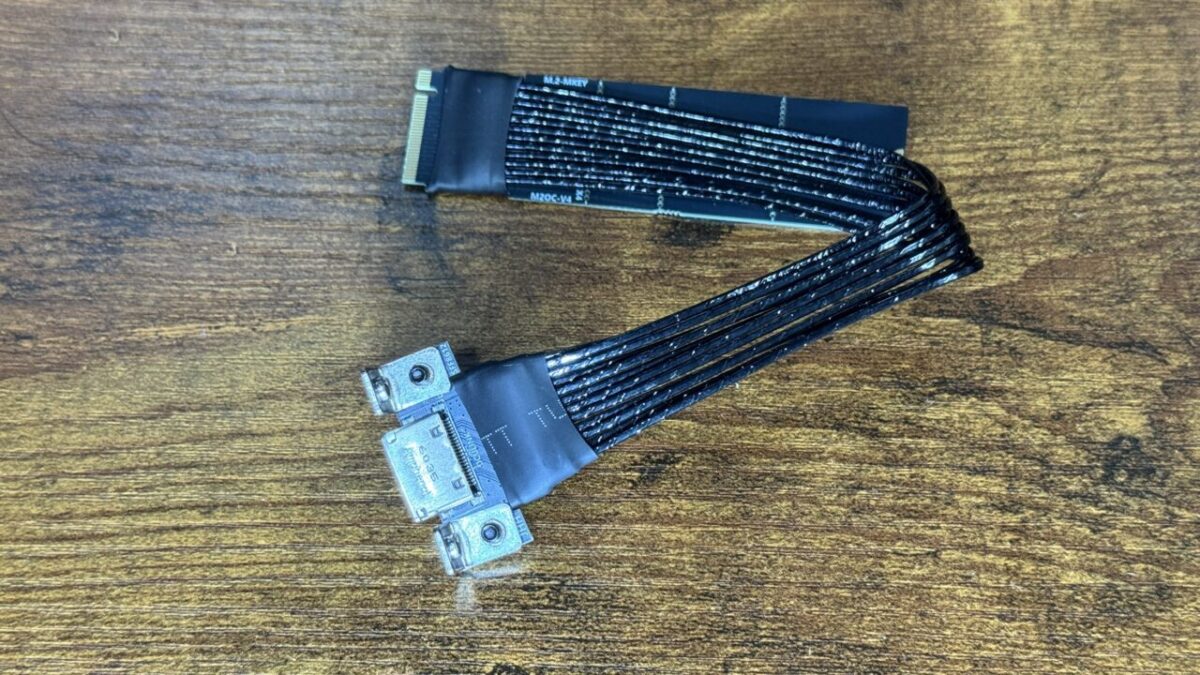
The part that plugs into the M.2 slot and the OCuLink port are separated by a flat ribbon cable. You can pull just the port out of the case, and that is the difference from the others.
Here is how it ended up.
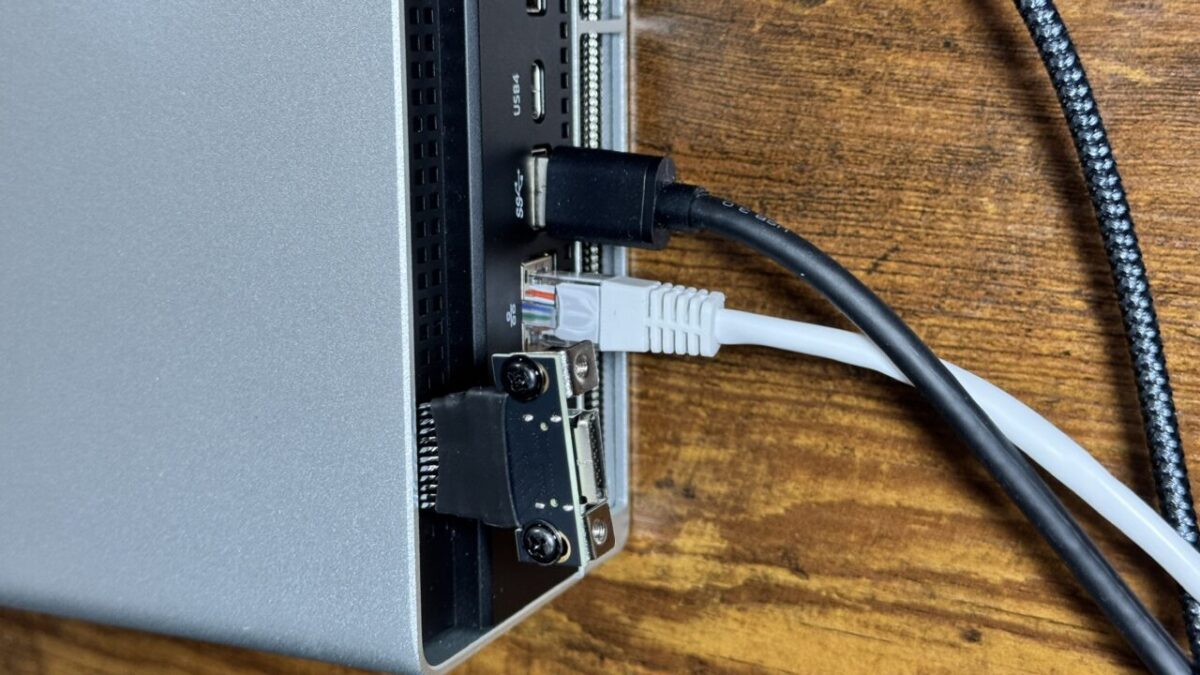
The ribbon goes through the narrow gap between the lid and the chassis, with only the port outside. It is not pretty, but nothing was filed, cut or drilled. In this state the external RTX 3060 is recognised and runs without trouble.
As the photo shows, the port is not fastened to anything. It just hangs there. It gets tugged every time a cable is plugged in or out, so strictly speaking it ought to be anchored.
That said, the OCuLink connector on this adapter has screw holes. Make something to screw it to and it can be held properly. A printed housing would probably look and sit better, but I have not built one.
The flat cable is also pinched between the lid and the chassis. Along with anchoring the port, a little more work would be reassuring if you plan to leave it like this for a long time.
JMT M.2 NVMe M Key to OCuLink 4i Adapter (cable type)The one that finally let the lid close
As an Amazon Associate we earn from qualifying purchases.
Sold under the same name, but there were three different shapes
That makes three adapters I have tried. All of them are sold as an “M.2 to OCuLink adapter," yet the shape changed the outcome.
| Shape | Operation | Lid | Cutting |
|---|---|---|---|
| Flexible type (thin ribbon PCB) | Unstable. Would not boot, or kept dropping out | — | — |
| Board-mounted type | Stable | Would not close | Needed |
| Cable type (this one) | Stable | Closes | Not needed |
The flexible type being unstable is covered in the notes on the previous article. The board-mounted type had no problem running at all; the only issue was where it sat. The cable type solved that.
This is the EVO-X2, though. Internal space and lid design differ from machine to machine, so the same choice will not always give the same result.
Wrap-up: correcting what I said last time
- Last time I wrote that cutting the chassis was hard to avoid. Change the adapter and no cutting was needed
- If the M.2 board and the port are separated by a cable, the port can come out through the gap between the lid and the chassis
- Sold under one name, there were at least three shapes, and both operation and fit changed with the shape
- This is on the EVO-X2. A different machine can give a different answer
Hanging an external GPU off a mini PC is not only about whether it connects. Questions of where things physically sit follow you around. Sometimes one small part settles it, and this was a record of that.
Hardware used
The one this article is about.
JMT M.2 NVMe M Key to OCuLink 4i Adapter (cable type)The one that finally let the lid close
The one used last time. It runs fine, but the lid will not close.
Xiwai PCI-E 4.0 M.2 M-Key to OCuLink SFF-8612/8611 Adapter (board type)Works, but the port sits inside the case
The cable used for the connection, and the machine itself.
GMKtec EVO-X2 (Ryzen AI Max+ 395 / 128GB / 2TB)128GB unified memory mini PC
At the far end of the OCuLink cable, this is the docking station that holds the graphics card and feeds it power. Same one as last time.
AOOSTAR AG01 External Graphics Card Dock (OCuLink)OCuLink only. PSU built in
Another OCuLink docking station. I have not tried this one, but it is worth listing as an option.
There are also mini PCs that come with OCuLink from the factory. None of this work is needed with those, though the memory is 64GB (manufacturer specification, checked 1 August 2026. I have not tested this machine myself).
And there is a machine that keeps the 128GB of memory and has OCuLink built in from the start. It is the successor to the EVO-X2.