Want to Type Long Text on the iPhone Duo? — I Looked Into 6 Japanese-Layout Mobile Keyboards
The iPhone 18 Duo is coming out. Unfold it and the screen gets bigger, so writing long text while out and about is starting to feel realistic. But no matter how big the screen gets, if you’re still typing on the keyboard inside the screen, you won’t be able to write any more than before.
So I went looking for an external keyboard with a Japanese layout. Browsing the listings, though, all I found were similar photos and similar descriptions, one after another. Does a keyboard that costs twice as much last twice as long?
This is research as of September 2026. I have exactly one of these on hand.
- 1. What I Looked At, and How I Chose
- 2. What’s the Difference Between the Two Types?
- 3. For Serious Typing, Which One?
- 3.1. The One I Own: Omikamo Keyboard [Latest Model], Bluetooth and 2.4GHz USB Wireless, Foldable, JIS Standard Japanese Layout, with Large Touchpad and Number Pad
- 3.2. ProtoArc XK01 Foldable Keyboard, Bluetooth, Slim, Lightweight, Portable, Connects to 3 Devices, Keyboard for iPad
- 3.3. ProtoArc XKM01 Foldable Keyboard and Mouse Set, Wireless, Bluetooth, 2.4GHz, Connects to 3 Devices, Lightweight, Slim, Portable
- 4. If Portability Comes First, Which One?
- 4.1. Arteck Wireless Keyboard, Japanese Layout, Multi-Device, Stainless Steel, Bluetooth Keyboard
- 4.2. Ewin Keyboard, Wireless, Bluetooth, Compact Keyboard, JIS Standard Japanese Layout, Works with iOS, Android, Windows, and Mac
- 4.3. Logitech Wireless Keyboard PEBBLE KEYS 2 K380sGR, Slim, Lightweight, 415g, Compact, Bluetooth, Easy-Switch, Japanese Layout, 36-Month Battery Life, Official Japanese Model
- 5. A 2.5x Price Gap, the Same Complaints
- 6. 3 Things to Check When Choosing
- 7. The Keyboard Weighs More Than the Phone
- 8. What I Haven’t Confirmed in This Article
- 9. Summary — It Comes Down to the Type and the Key Layout, Not the Price
- 10. Keyboards Covered in This Article
What I Looked At, and How I Chose
A quick note for readers outside Japan: a Japanese-layout keyboard (called JIS) is the standard layout sold in Japan. It has a few extra keys for switching between Japanese and English input, a taller Enter key shaped like a backwards “L," and some symbols in different places from the US layout. Everything below is about JIS models bought in Japan. The product links in this article go to Amazon.com searches, where the versions sold are generally the US layout.
On Amazon Japan, I sorted searches for “foldable keyboard Japanese layout" and “mobile keyboard" by rating, and picked the 6 with the most ratings. Going by stars alone would treat a 4.5 from 10 people the same as a 4.0 from 5,000 people.
For each of the 6, I read 5 five-star reviews in order of most helpful, and 5 one-star reviews sorted the same way. Read only the 5-star ones and you only hear the good things; read only the 1-star ones and every product looks unusable. Reading the same number from both ends shows you what gets praised and what breaks for that product.
| Use | Product | Price | Rating | Number of ratings |
|---|---|---|---|---|
| Serious typing | ProtoArc XK01 | ¥5,299 | ★4.0 | 4,522 |
| ProtoArc XKM01 (with mouse) | ¥8,580 | ★4.3 | 2,182 | |
| Omikamo (the one I own) | ¥6,980 | ★3.9 | 89 | |
| Portability | Arteck | ¥3,899 | ★4.0 | 5,451 |
| Ewin compact | ¥2,498 | ★4.2 | 4,095 | |
| Logitech PEBBLE KEYS 2 K380s | ¥4,373 | ★4.2 | 1,067 |
Prices, ratings, and rating counts are the values I checked on September 22, 2026. Amazon prices move often, so they may be different when you look.
What’s the Difference Between the Two Types?
As I looked through them, it became clear that mobile keyboards split broadly into two types.
One is the folding type. Folded, it shrinks to about the size of a smartphone; opened, it spreads out to nearly the width of a laptop keyboard. This is the type that gets a number pad or a touchpad. In exchange, there’s a fold down the middle, and more parts means more places that can break.
The other is the small non-folding type. It’s a single board, so there’s no fold, and the structure is simple. But it stays small even when in use, and there’s no room for a number pad.
The question is whether you care more about how thick it is in your bag, or how wide it is when you type.
For Serious Typing, Which One?
The One I Own: Omikamo Keyboard [Latest Model], Bluetooth and 2.4GHz USB Wireless, Foldable, JIS Standard Japanese Layout, with Large Touchpad and Number Pad
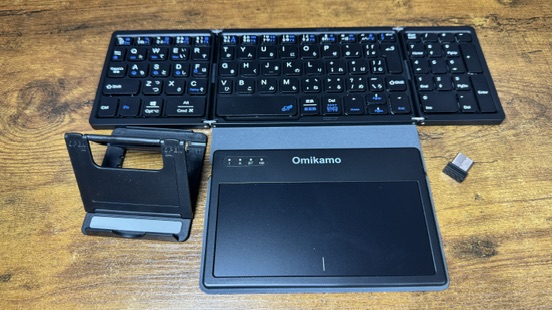
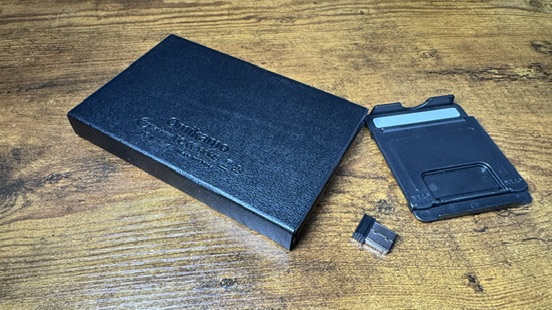
Let me start with what I found after using it for a while.
The keys are fine. The low ratings include stories like “pressing either i or o types io," but that hasn’t happened on my unit. The connection is stable, too. Low ratings also had people saying “it won’t connect at all," but mine has never dropped.
As for how it feels to type on, it does feel cheap. It’s not like a high-end keyboard, where the key bottoms out with a solid, cushioned stop. But it isn’t bad. Considering it comes with a number pad and a touchpad at this price, it’s well within the range of perfectly typeable.
What bothered me was the touchpad. It isn’t very responsive, though it’s not unusable. The bigger issue is its position: it’s shifted to the right relative to the keys. With my hands on the home position, it doesn’t sit under my thumbs.
So I use it with the touchpad turned off via Fn + Space. That stops my palm from brushing it mid-typing and sending the cursor flying, and I can turn it back on only when I need it. If you use this model, it’s a handy shortcut to learn first.
One more thing: the hinge where it folds sits higher than the keys. My fingers hit it while typing, so it is something you notice. That said, I got used to it within a few days.
The power button isn’t in an easy spot to press, either. And here’s the part that worries me a little: the switch is pressed through the faux-leather cover. Since it’s something you press every day, I expect the faux leather over the switch to wear out before long. It won’t stop the keyboard from working, but it’s a point to keep in mind for something you carry around.
As an Amazon Associate we earn from qualifying purchases.
It weighs 285g, and folded it fits into about the same area as a smartphone. What sets it apart is that it fits both a number pad and a large touchpad into that size. The layout is JIS standard, with the backwards-L Enter key and Shift and Alt on both sides. The function keys are a separate row of their own, so you don’t have to break your stride to reach copy or paste.
It connects via both Bluetooth and a 2.4GHz USB receiver, and can switch between up to 4 devices. It also plugs into machines that don’t accept Bluetooth, so it isn’t picky about what you pair it with.
One thing from the reviews impressed me: when folded, it’s held shut by magnets on the inside. According to the reviewer, the rubber covers over those magnets also rest on the desk when it’s opened, keeping the keyboard steady, so one part does two jobs.
The drawback people mentioned was that there’s no place on the keyboard to store the USB receiver. One reviewer wrote that they’d “take even a string," since it seems easy to lose.
ProtoArc XK01 Foldable Keyboard, Bluetooth, Slim, Lightweight, Portable, Connects to 3 Devices, Keyboard for iPad
Of these 6, it’s the folding type with the most ratings. At ¥5,299, you get a number pad.
What came through most in the 5-star reviews was size. One person wrote that “folded, it’s about the height, width, and thickness of a Nintendo Switch," which I thought was an easy way to picture it. Battery life of about 1 month per charge and support for the Mac layout also came up.
It’s also unusual to see people praising the instruction manual. One reviewer said some symbols were in the wrong places, they reconfigured it as the manual described, and it was fixed. They were impressed that the manual even covered that.
On the other hand, the 4-star and 1-star reviews list the things that snag you in daily use: the rubber feet come off easily, you can’t adjust the height, and Home and End sit right next to Enter, so you hit them by mistake. That last one seems to catch people with larger hands most.
ProtoArc XKM01 Foldable Keyboard and Mouse Set, Wireless, Bluetooth, 2.4GHz, Connects to 3 Devices, Lightweight, Slim, Portable
Also from ProtoArc, this one is the set that comes with a mouse. At ¥8,580 it’s the most expensive this time, and at ★4.3 it has the highest rating.
Many of the 5-star reviews praised how it’s built as something to take out with you: “the case holds the keyboard and small accessories, which is handy," “switching between Bluetooth and USB is easy."
What to watch out for is size. One person who gave it 5 stars went out of their way to add this: “The keyboard is about the size of a laptop keyboard with a number pad added. I was expecting something a bit bigger, closer to a regular keyboard, so that part was disappointing." And of the mouse: “it’s a little thin, so it didn’t fit my hand." This person kept it at 5 stars, calling it their own mistake in choosing, but it’s something you’d want to know before buying.
If Portability Comes First, Which One?
Arteck Wireless Keyboard, Japanese Layout, Multi-Device, Stainless Steel, Bluetooth Keyboard
It has the most ratings of the 6 in this article, at 5,451. ¥3,899.
What kept coming up in the 5-star reviews was how rigid it is. “The bottom is aluminum, so it feels solid, and it doesn’t flex even when you type hard." “It’s a scissor-switch design with a 19mm key pitch, so it feels easier to type on than a lot of laptops." Someone also pointed out that there’s rubber on the four corners underneath, so it doesn’t slide around on the desk.
I also noticed people who’d had problems with other products moving over to this one.
The 1-star reviews, though, gather complaints that aren’t about anything breaking. It’s the function keys. Pressing F1–F12 on their own changes the volume or screen brightness, and to get the actual F1–F12 you have to hold Fn at the same time. On top of that, there’s no setting to swap that behavior (an Fn lock). Someone who uses F2 heavily in Excel wrote that “this became so stressful I stopped using it."
Ewin Keyboard, Wireless, Bluetooth, Compact Keyboard, JIS Standard Japanese Layout, Works with iOS, Android, Windows, and Mac
At ¥2,498, this is the cheapest one this time. Even so, it has 4,095 ratings.
One review gave concrete dimensions: “it’s 29.5cm×12.5cm, so typing was smooth and stress-free." Compact as it is, it doesn’t seem cramped for your fingers. People who connected it to a smartphone also reported no lag or dropouts.
There were also reviews praising the seller’s support. Some keys started acting up, the reviewer got in touch, and a replacement arrived right away.
What stands out in the 1-star reviews is the report that on a Mac, F1–F12 don’t work at all. The reviewer said they work in the Windows layout but not in the Mac layout, and returned it. Another pointed out that the power switch is on the underside, so it’s easy to forget to turn off.
Logitech Wireless Keyboard PEBBLE KEYS 2 K380sGR, Slim, Lightweight, 415g, Compact, Bluetooth, Easy-Switch, Japanese Layout, 36-Month Battery Life, Official Japanese Model
The only one from a major manufacturer, at ¥4,373. 415g.
What the 5-star reviews mentioned most was connection stability: “The Bluetooth connection is extremely stable." “It’s quick to reconnect after a timeout or after switching devices." On the layout, one person said, “Since it’s a Logitech, the layout isn’t weird; it’s perfectly ordinary and easy to type on." Read the other way, that means people struggle with the layouts on other brands.
Running on AAA batteries was also taken as a plus with this product. “It runs on AAA batteries instead of a built-in battery, so if they die you can just swap them and keep going. The batteries last three years."
Its weak point is clear: the round keys. The 5-star reviews say things like “the round keys are cute" and “I worried they’d be hard to type on, but not at all," while the 1-star reviews say the exact opposite: “with round keys you can only press with the very tip of your finger," “in reality you’re not hitting the dead center of each key." I read the round keys as a split in how people like to place their fingers.
And here, too, the complaint that the function keys default to media keys comes up. Same as the Arteck.
A 2.5x Price Gap, the Same Complaints
After reading the 1-star reviews for all 6, this is what surprised me most.
For every product, the core of the low ratings is “the keys stopped responding." The same words show up for the ¥2,498 one and for the ¥8,580 one.
| Product | Price | What the 1-star reviews said |
|---|---|---|
| Ewin compact | ¥2,498 | Bought in April, unusable by September / after 2 months, power cuts out after 1 minute |
| Arteck | ¥3,899 | Key chatter around Enter after 3 months / characters repeating after 1 week |
| K380s | ¥4,373 | Can’t connect after just over 1 year / stopped responding after 2 months |
| ProtoArc XK01 | ¥5,299 | Certain keys after 1 week / a, s, d after 1 month / left half after 3 months |
| ProtoArc XKM01 | ¥8,580 | BackSpace after 2 weeks / certain keys after 3 months / left side after 6 months |
As the price goes up, the typing feel and build quality get better. But from this lineup of reviews, you can’t say “the more expensive one breaks less." If anything, the most expensive one, at ¥8,580, has failure reports gathered at different points in time: 2 weeks, 3 months, and 6 months.
What caught my attention is that reports of the replacement unit breaking the same way show up for more than one product. “I returned it and bought a second one, but the buttons in the same spot were still misaligned or didn’t work." If that’s true, it starts to sound less like a bad unit and more like a problem with the design itself. However, only some people wrote this, and I haven’t verified it myself.
If this were a structural problem, the same symptoms should also show up in the high-rated reviews of the same product. In reality, the 5-star reviewers say nothing has happened. So the straightforward reading is not “everyone’s breaks" but “a certain share of them break."
3 Things to Check When Choosing
Putting all this together, what matters turned out not to be the price.
1st: whether it folds. If you need a number pad or a touchpad, go with the folding type; if you don’t want your bag to get any thicker, go with the small type. This was the first fork in the road.
2nd: how the function keys behave. This time, 3 of the 6 drew complaints about it, and the Logitech is one of them. If you use F1–F12 for work, it looks worth checking before you buy whether you can use them directly without pressing Fn, or whether that setting can be swapped.
3rd: how it’s powered. “Runs on disposable batteries" was received in opposite ways. For one product, it drew the complaint “two AAA batteries, in 2026?", while for the K380s it was written up as a plus: “no built-in battery, so it doesn’t degrade." A rechargeable one slowly drains in your bag; a disposable-battery one needs fresh batteries when it dies. Which suits you depends on how you carry it.
The Keyboard Weighs More Than the Phone
Having written all this, one last thing snagged me.
Having used the Omikamo I own, I think it’s quite usable overall. But once you think about carrying it together with the iPhone Duo, the story changes.
| Item | Weight | Relative to the phone |
|---|---|---|
| iPhone Duo (the phone) | 254g | — |
| Omikamo (the one I own) | 274g | 1.08x |
| ProtoArc XK01 | 291g | 1.15x |
| Arteck | 304g | 1.20x |
| K380s | 415g | 1.63x |
| Ewin compact | 420g | 1.65x |
| ProtoArc XKM01 (including mouse and case) | 840g | 3.31x |
The iPhone Duo weighs 254g. The keyboard weights are the values listed in Amazon’s product information. Lined up like this, all 6 turn out to be heavier than the phone. Even the lightest one is 20g over, the K380s from a major manufacturer is 1.6x, and the set that includes a mouse is 3.3x.
Size is the same story. Closed, the iPhone Duo is 84.1×117.8mm, about the footprint of a passport. A folding keyboard is still about smartphone-sized when folded, so in your bag it takes up the space of the phone plus one more device.
A folding smartphone is a tool for having both portability and a big screen at the same time. Adding a keyboard heavier than the phone is also a choice that undoes that balance yourself.
Whether it’s still worth adding depends on how much you write while out. If you just jot down things that occur to you on the move, the on-screen keyboard is enough. If you settle into a café and write for 1 hour, the weight should pay for itself. I’m in the second group, so I carry one, but this is where the answer changes from person to person.
What I Haven’t Confirmed in This Article
- The only one I’ve actually used is the Omikamo, 1 unit. For the other 5, I only read Amazon reviews and didn’t use them myself
- I didn’t try any of them with an iPhone 18 Duo. It hasn’t been released yet, so real-device connection checks aren’t included
- I didn’t measure durability. “Broke within a few months" is what reviews said, not something I reproduced
- I read the top 5 each of the 5-star and 1-star reviews, 10 per product. I didn’t read every review, so I can’t say this is a miniature of the whole picture
- Since I read reviews sorted by most helpful, the picture leans toward opinions many people agreed with. Minority points aren’t captured
- Prices, ratings, and rating counts are as of September 22, 2026
- The weights are the values listed in Amazon’s product information, not something I weighed myself. For the Omikamo I own, the product description says 285g and the product information says 274g, so the sources disagree
Summary — It Comes Down to the Type and the Key Layout, Not the Price
- Mobile keyboards split into the folding type and the small non-folding type. If you need a number pad or a touchpad, go with the former; if keeping your bag thin comes first, the latter
- Reading the 1-star reviews for all 6, “the keys stopped responding" comes up across the board, even with a 2.5x price gap. I couldn’t say the more expensive ones break less
- Separately from breakage, complaints that the function keys default to media keys came up for 3 of the 6. The Logitech is the same
- Disposable batteries were a complaint for one product and a plus for another. It comes down to how you view being able to swap them when they run out
- The Omikamo I own fits a number pad and a large touchpad into 285g. Folded, its footprint is about the size of a smartphone
- What snagged me on that real unit was everything around the keys. The keys and connection were fine, and the typing feel is cheap but not bad. What bothered me was the touchpad being shifted to the right, the hinge sitting higher than the keys, and the hard-to-press power button. None of these show up in the reviews
- All 6 are heavier than the iPhone Duo (254g). Whether to add something heavier than the phone to a folding smartphone depends on how much you write while out
A bigger screen doesn’t change how much you can write if the tool you type with stays the same. But it’s also true that the tool is heavier than the phone itself. If you’re buying a folding smartphone, it seems worth giving some thought, at least once, to what that second device in your bag should be.